Blogs


Deprecated: Function start_wp is deprecated since version 1.5.0! Use new WordPress Loop instead. in /home/dkworldw/public_html/techlife/wp-includes/functions.php on line 5445

MinnPost.com Homepage

As a weary web traveler, Techlife’s journey is to uncover the small stuff and review the larger stuff, but how about the things in between. MinnPost is rare gem, a non-profit web startup with a local focus that is ready to expand past their roots. I recently had a chance to sit down with Joel Kramer, editor and founder of MinnPost.com. Joel and his band of writers, akin to Robin Hood and his band of merry men, are forming the next wave of journalism. No filters, they are the company. They believe in bringing good journalism to the reader without corporate oversight.

This unfiltered experience has the feel of a well written newspaper but the flavor Techlife readers will enjoy. Their roster of experienced writers might not be globally known, or even nationally known, but their local flavor of delivering quality reporting to Minnesotans gives them credibility in their local community. As a syndicated columnist who covers technology and life, maybe Joel will consider adding another budding journalist to his crew. Joel’s balance of digitizing the newspaper is something many publishers around the country are watching closely.

Techlife: What is MinnPost.com?

Joel Kramer: MinnPost.com is a high-quality news site for news-intensive people who care about Minnesota . We publish ambitious stories and shorter posts five days a week. The work is done by top-notch professional journalists, many of them with decades of experience.
(more…)


Deprecated: Function start_wp is deprecated since version 1.5.0! Use new WordPress Loop instead. in /home/dkworldw/public_html/techlife/wp-includes/functions.php on line 5445

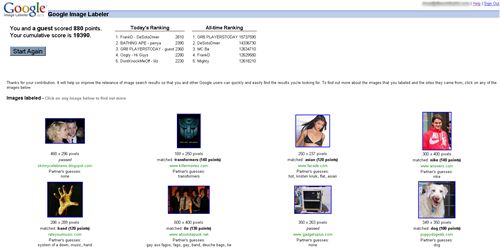
Google Image Labeler Points Screen

Google has achieved the “Field of Dreams Effect”. Simply put, this effect coined by Techlife, means there is no longer a preceding qualifier to the famous phrase by author W.P. Kinsella’s character of the “Baseball Announcer” in the book Shoeless Joe and the movie Field of Dreams:

If you build it, he will come.

Techlife’s “Field of Dreams Effect” states:

“Build it and they will.”

Purposely left open ended, this phrase intends to cover both people who build (in this case Googlers) who build cause they can, and users or customers (Google’s users) who will use what Google has built, because it exists.

Google Image Labeler is one of these creations, hatched using some licensed technology from Carnegie Mellon University. Google wanted to improve the results from the Google Image Search tool, and realized that using the power of “us” they could improve their results dramatically. They created a social game, where the blindly pair up two people for 2:00 minutes and let you race to match terms about random images that show up.

Google Image Labeler In-Game Screen
It is easy, free and rather addicting. For those of you social context types, you could be helping improve search results for a global audience. For you cynical types no question it is a sweatshop and you get paid in points redeemable for nothing. For you gamers, it is a highly addictive free game where the goal is to be cooperative with your partner to gain the most points.

Techlife previously covered Guess the Google, a very addictive game also based on Google Image Search. Which do you like better? Tell us.


Deprecated: Function start_wp is deprecated since version 1.5.0! Use new WordPress Loop instead. in /home/dkworldw/public_html/techlife/wp-includes/functions.php on line 5445

Samorost2

In 1984 Sierra On-Line released King’s Quest I: Quest for the Throne. (Bonus: The link contains a playable remake on today’s computers, that has been downloaded 190,000 times.) It was a new kind of adventure game with a great story, amazing visuals (for the time) and a bit of humor thrown in for good measure. The player was dropped into the middle of a story, in the middle of a world they had no real connection with other than knowing it was a game. After many sequels and genre’s, the games only live in fan’s minds.

Samorost1

Techlife just finished playing a game that has a great story, amazing visuals and a bit of humor, but also has a great musical score, and an enjoyable interface from Amanita Design. Samarost1 and Samarost2 are free point and click, puzzle games built in Flash. If you get hooked they offer a downloadable extended Samarost2 for just $6.90USD. This company from Brno, in the Czech Republic was founded in 2003 by Jakob Dvorsky.

[youtube]1pZhT3VWsJM[/youtube]

Amanita Design has done a few other great projects like Samorost, check out The Quest for the Rest a commission for The Polyphonic Spree. And their upcoming game Machinarium looks really amazing and already is getting a following.
Machinarium Preview

Thanks to one of my editors of all people, who pointed out Samorost1 and Samorost2. (Suck up alert) Any editors that are looking for a great syndicated column for their publication, please contact me. We welcome submissions from anyone, even editors. Send them to techlife [at] dkworldwide [dot] com.


Deprecated: Function start_wp is deprecated since version 1.5.0! Use new WordPress Loop instead. in /home/dkworldw/public_html/techlife/wp-includes/functions.php on line 5445

ZipSkinny.com tells all about New York's 10001 zip code

Are you into data? Here’s a funny story, Techlife covered Nick Douglas’s Look Shiny and his first show. Then we covered Taylor McKnight and Chirag Mehta’s awesome mashup Chime.TV. (We have our own channel, Techlife TV – check it out sometime.) So why are these two things related? Good question. In a recent post Nick posted about really cool site, ZipSkinny, a site that provides extensive demographic information by zipcode compiled form the US Census from 2000. Nick in his usual humor filled manner, was commenting at how poor some of the neighborhoods he knows happen to be. And to make this a small world, he mentions Taylor. So in reading all of this I learned about ZipSkinny (thanks Nick) and I learned Taylor and Nick are friends (thanks both of you.)

While ZipSkinny.com has the typical disclaimer that the site should not be used for serious decision making, such as moving or opening a business, and how some data is incomplete or has such a small sample size it can not be considered reliable, this site is a goldmine. It really has taken data exploration to new levels. If you are in real estate, a realtor, or looking to buy a home it is at least a place to start.

ZipSkinny has maps and pretty charts
With data points such as:

  • Population
  • Density
  • Educational Achievement
  • Marital Status
  • Household Income with brackets
  • Occupation
  • Unemployment/Poverty
  • Age
  • Racial Diversity
  • Male/Female with age brackets
  • Map of the zip code

And features such as:

  • Zip code to US comparison
  • Zip code to nearyb Zip code comparison
  • Zip code to state to US comparison
  • Top 100 zip codes in the state or US by any of the data points
  • Ability to compare up to 20 codes side by side data

I think the most interesting thing about ZipSkinny, the lack of credit. Who built it? Anyone know?


Deprecated: Function start_wp is deprecated since version 1.5.0! Use new WordPress Loop instead. in /home/dkworldw/public_html/techlife/wp-includes/functions.php on line 5445

Ballistick with new weapons - Flamethrower and a Plasma Cannon?
Everyone has their favorite games. Techlife recently has been addicted to Casual Collective’s Multi-Player Desktop Tower Defense (invites available here). Good games have that effect. WoW or World of Warcraft fans take their addiction to new levels.

[youtube]v4Wy7gRGgeA[/youtube]

But one of the best games of all time is XGen Studio’s Stick Arena. Skye Boyes, friend of Techlife, is one of the creator’s XGen’s popular 4 person flash game. We interviewed Skye to talk about gaming, Stick Arena and Ballistick their newest game, that has been a long time coming. Skye was kind of enough to provide us three exclusive game images of Ballistick. Nearly a year ago XGen posted this trailer of Ballistick to wet the appetites of Stick Arena fans. So the real question is: When is Ballistick coming? Read on to find out.

[youtube]mOwSnApk35g[/youtube]
(more…)


Deprecated: Function start_wp is deprecated since version 1.5.0! Use new WordPress Loop instead. in /home/dkworldw/public_html/techlife/wp-includes/functions.php on line 5445

Prospecting the Perspective from idigitalphoto.com - Zoom in

Taking good pictures is hard work. The best digital camera is still just a tool for capturing the world the way you see it. In my consulting firm we often work with client’s photos, and I can’t tell you how many times they send 100 or more photos and there isn’t a single good shot among them.

We often suggest a few various photography tips to taking better pictures, but the recent article from Tom Ang and Markus Urban titled, “Improve your Photos 60 seconds at a Time” is probably the perfect Techlife article for our readers and our clients. As the title suggests it is fast, easy reading that really hits home the point, we all can improve our photos. I knew a few of the many great things they covered, but they hit upon many more I didn’t know. They break down 6 lessons into small, easy to read 60 second chunks and of course have great example photos for each lesson. I liked the nice zoom tool they used for their photos.

Their lessons cover: Light Landscaping People Color Composition Being Ready

Mastering the Flash - from idigitalphoto.com

As they are focused on more on taking great photos, I would add the simplest but most effective way to change a photo is to crop it. Today’s digital cameras take such high resolutions that cropping the photo will still end up providing a great image. Think about taking a bad shot and applying their rules during the crop. Simple tools like Picasa, free from Google, offer powerful, easy to use crop tools that let you preview what it might look like.

Tom and Markus have written a great lesson in photography basics and any person who owns a digital camera should read this article. Your relatives will thank you, because your photos will be interesting and fun.


Deprecated: Function start_wp is deprecated since version 1.5.0! Use new WordPress Loop instead. in /home/dkworldw/public_html/techlife/wp-includes/functions.php on line 5445

Miami Heat's Dwayne Wade Sidekick 3Google Docs and Spreadsheets new main interfaceiPhone image courtesy of WiredTechlife readers know I am big fan of Google Docs. Even Google knows. It is a great tool for collaboration. I also use a Sidekick from Tmobile, and today those worlds collide with the introduction of Google Docs Mobile. Google Docs for your mobile device, also works on such smart phone platforms as iPhone, Blackberry or Windows Mobile but as this reviewer says it is really Google Docs Mobile Viewer.

On the Sidekick you need to enable Javascript, which is common enough. The main page where all my recent docs reside is a great adaptation for the mobile device. It really lets me see the important things quite easily. That is where the goodness ends. The only somewhat manageable document type is a word processor to view mobile. The spreadsheet gives such a small view that it is really unusable and their brand new presentation tool does not work.

Now we all know that Google will evolve this toolset, as they are prone to do. And with the recent announcement of the gPhone being produced, it is clear their next area of growth is mobile. This offering could have been in the labs a few more weeks because my initial excitement was quickly replaced with disappointment at only having “real” access to my word processing documents and here’s the biggest surprise. No edits!

They opted to leave out the capability to edit in this early alpha beta release, which is a big disappointment. What mobile have you tried it out with?

Thanks to Lifehacker for the post.

advance pennsylvania payday loanin advanced loans check idahoin bankruptcy after auto loan ohioaid student loan federalaid loan studentpersonal chart amortization for loan16 direct com payday 11 loanloan finance household insurance 121bad with 20000 credit personal loanspersonal loan 000 30 unsecured


Deprecated: Function start_wp is deprecated since version 1.5.0! Use new WordPress Loop instead. in /home/dkworldw/public_html/techlife/wp-includes/functions.php on line 5445

Google Docs Blog Logo The Book Standard Logo
It’s always great to hear from readers of the column. Lately we have been picking up steam in that department. Lots of comments in various articles. Another feather in the cap is when a fellow writer references work you have done or asks for a quote, as an expert.

Google Docs Blog LogoRecently, an uncredited employee of Google wrote on “The Official Google Docs Blog: News and Notes from the Google Docs Team” a post about how s/he helped their fantasy football commissioner and league use Google Docs. They assisted in streamlining the league’s fantasy draft and other management. It is a great article and certainly makes a lot of sense for anyone in fantasy sports, especially those of you who have trouble getting in one place at one time for the draft. At the end the writer added this nice little tip for those preparing for the draft.

(Docs & Spreadsheets user Dave Kaufman also shared his experience with the draft.)

The Book Standard LogoShortly after that I was contacted by Kimberly Maul from “The Book Standard“, who was writing an article on Techlife favorite Daily Lit. Kimberly wrote a great piece about the history of Daily Lit and a bit more about where they are going with a pay for content model. It seems exciting. She also was nice of enough to include this quote I made about Daily Lit.
“Daily Lit is one of those services that is game-changing, but on the surface appears very simple,” said Dave Kaufman, a blogger who writes the TechLife blog, about Daily Lit. “Think of all the countries where Internet access is limited in time, bandwidth and speed. Imagine how easy it would be for a teacher to incorporate classic literature into the curriculum. Its simplicity could allow global access to information and education.”

It is always nice to hear from readers, writers and business owners. Feel free to email or comment.


Deprecated: Function start_wp is deprecated since version 1.5.0! Use new WordPress Loop instead. in /home/dkworldw/public_html/techlife/wp-includes/functions.php on line 5445

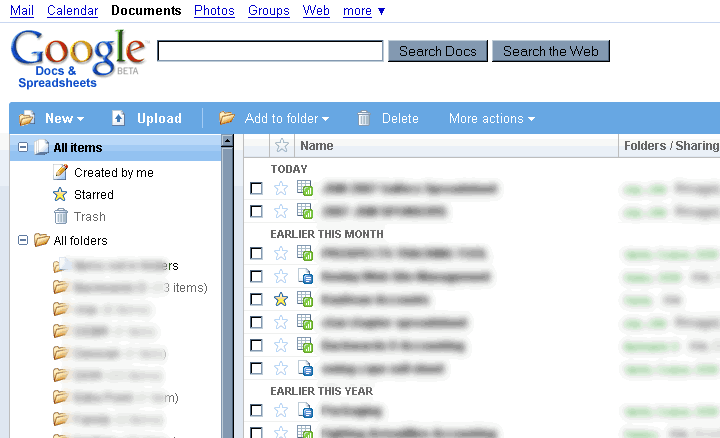
Google Docs and Spreadsheets new main interface

I often use Google Docs for collaboration with teams who are not uber-geeks tech savvy. Examples include clients, family, fantasy football partners, and charity work. Most of these folks don’t know what RSS or an RSS Reader is at all. They would be happy to subscribe via email though to a document that was going to be important, but today Google doesn’t offer that feature.

As tech leaders (people who read Techlife) I have a simple tool for you to use that might help educate your collaborative group. Funny enough this tool is low tech. Teach your group to “Share”. Here is a copy of an email I send using Google Docs after creating a new document, it helps foster the collaborative work environment that makes Google Docs a great tool. Please feel free to copy and paste this email and send it using the share tab in Google Docs. Your teams will thank you.

I know some of you might not have used Google Docs very much so let me point out another feature/downfall.There is no automated notification of someone’s working on the documents. Meaning you won’t get any emails if people make major/minor changes.

But there is a tab in the upper right hand corner “Share”, click on that and then click on “Email collaborators” which will let you send an email like this one. With anything you want in the body including a pointer to what has changed.

I look forward to seeing your work.

Encourage your teams and collaborators to use Google Docs for documents that need multiple eyes. It will help the whole team. The Google Docs Tip of sharing, with an announcement via email will help keep everyone aware of the document’s changes even without RSS.

This great video featured on Techlife TV sums up the Google Docs experience, “Google Docs in Plain English” by CommonCraft’s Sachi and Lee LeFever.
[youtube]eRqUE6IHTEA[/youtube]

Do you have any good Google Docs tips? Post them.

manga clips free anime lestai hentai video lesbian{de}yiff Spiel Furryund Geschlecht Pissing scheißendgay Pokemon hentaiBehaarte fucking Grandpareifen Interrassisch Gag-ClipsFoto peeing Mädchen cam tolite hiddenporn hätte MMF InterrassischAsian Versaute scat


Deprecated: Function start_wp is deprecated since version 1.5.0! Use new WordPress Loop instead. in /home/dkworldw/public_html/techlife/wp-includes/functions.php on line 5445

Vote 2 by Steve WoodsEveryday you use many websites. But which of them are everyday websites?


Everyday websites are defined as sites you visit nearly everyday, often multiple times. Useful, fun, informative but most importantly not because someone sent you a link. Techlife is interested in the sites you choose to visit. (online applications count too.)
Google? Yahoo? MSN? Sure these are the most common. NYTimes? ESPN? Wikipedia? These are popular, too. But I am looking for the deeper, more interesting sites and the reasons.

I will post mine here:

  • Google Docs has become a regular for word processing and spreadsheets. I am constantly using it for collaboration with others.
  • FeedCrier to help me pick the best things to read via RSS. Lifehacker, Engadget and Gizmodo pop up pretty frequently.
  • I have been playing too much of Casual Collective’s Multi-Player Desktop Tower Defense. A lot of Techlife readers have joined me with a free invite.
  • I use SmartMoney’s portfolio tracking tools and sometimes Yahoo’s Finance tools to watch and learn about the economy and stock market.
  • I use Tmobile’s Sidekick Desktop Interface to manage my mobile Sidekick device’s online calendar, address book and notes applications. (no link available for general public, subscription only)
  • I watch and edit Techlife TV on Chime.tv. I often just browse other channels and watch for a while, like regular television.

I really want to know what sites everybody else uses and why. Post them in the comments.

ameriquest loans203k ma loansstafford plan a-subsidized loans federalloan ameriquest mortgage paymentloans 203k ct2007 farm bill loan nonrecourseloans louisiana agriculture youth in$333 $100,000 loan month Map


Deprecated: Function start_wp is deprecated since version 1.5.0! Use new WordPress Loop instead. in /home/dkworldw/public_html/techlife/wp-includes/functions.php on line 5445

Techlife TV has our first double feature today. (If you are a mobile or print reader, visit Techlife’s web site to watch.) Today’s theme is image manipulation on your PC.

Photoshop? Illustrator? Corel? Gimp? Picasa? SeaDragon? These programs all owe homage to the grand daddy of them all MS Paint. In this look behind the Microsoft development curtain we catch up with the MS Paint team as they explain how to use MS Paint and how they built it. Riveting.
[youtube]Hxx2KcPWWZg[/youtube]

Now check out a real world application of how a computer could calculate quickly how an image is resized. This is a must see to fully understand. Some researchers in Israel have come up with a way to dynamically resize images in a web page. A web page could be resized, but how would an image know what is important, this video explains how using seams the image can be stitched together and goes way beyond cropping and scaling
[youtube]vIFCV2spKtg[/youtube]

I hope you enjoyed the double feature.

Can you spot the faux pas in the MS Paint video? Post your answers below.

free cock gigantic moviesfree gyno moviesfree movie trailers hardcorehardcore movies free samplehorse free fuck moviehot free movies teenfree off movies jerkgalleries latina deepthroat movie free Map

pee 8 moviesporn movies free xxx free moviespreteen sex moviesprivate nurse movielords porn movies tracimovies sex machine vibratormovie things wild scene the sexmovies indian xxx Map

loan $10000 overnightloans amerisaveacceptance loans biloxi msinterst loans 0401k loan hardshiploans aes forgivemessnumber phone ameriloan$5,000 microloan Map


Deprecated: Function start_wp is deprecated since version 1.5.0! Use new WordPress Loop instead. in /home/dkworldw/public_html/techlife/wp-includes/functions.php on line 5445

Google Spreadsheets now with charts and graphs - Pie, Bar, Scatter and more

This year I happen to be a in few fantasy football leagues (not into fantasy sports, these same tools are used by my company everyday too, so keep reading.) These days most fantasy football leagues are managed online with any number of large and small websites doing the player tracking and record keeping. It makes drafting, managing and setting your lineup each week pretty easy. Last year my team won our league, no small thanks to LaDanian Tomlinson, as he smashed NFL records. Thanks LT.

Last year and again this year we used another often talked about tool, Google Docs and Spreadsheets. Most people in fantasy football prepare for the draft using a spreadsheet application like Excel. It helps sort their rankings of players based on their league’s specific scoring system, but doing it online has a few added benefits. All of which helped the 2006 Fantasy Football Champions prepare in their championship season and in this year’s title defense.

  • Auto-saving – While a seemingly small feature, since the document is saved every few seconds remotely, even when we lost power (which happened) we didn’t lose a single minute when power was restored as our data was safe and up-to-date
  • Revisions – A few times we realized in our prep that we had made a mistake copying and pasting a formula or row of formulas. Google Docs offers the chance to go back in time to review different saved versions of the documents along the way. This makes it easy to find the place the error was made and correct it.
  • Collaboration – No longer did we have to email big files and have a check in/out process. We just both started working even on the same sheet at the same time. This made all the difference when we had conference calls and needed to show different scenarios live to each other.

Will you win your fantasy league if you use Google Docs? No. Will it help? Yes. During the course of working another added benefit was when I was out of town, I was able to access my spreadsheets with ease. Fantasy Football is constantly changing and becoming more and more competitive with more players, more time is spent working on your “lists”. Make it easier on yourself, give Google Docs a try.

Do you have a winning story about using Google Docs and Spreadsheets? Share it with us.

loan america questamerican loans home airlineschartered american home bank loansconsolidation american loan collegeloans service american student consolidationamortize loan autoloans $6000loan acquisition and development 100loan commission officer 100term 1000 short loan

porno trailers moviegagging nasty cum movies12 movie dbzfree clips fucking movieraquel movies free darrianmovies girlpublic sex moviesfree movie sex Map


Deprecated: Function start_wp is deprecated since version 1.5.0! Use new WordPress Loop instead. in /home/dkworldw/public_html/techlife/wp-includes/functions.php on line 5445

Multi-player Desktop Tower  Defense game play

Techlife has invites to the private Casual Collective, the casual gaming multi-player site we have been beta testing for a little while now.  To get one, comment and we will invite you.  This will get you a free invite to the Multi-player Desktop Tower Defense.

We even set up a Techlife Collective, that we would love if you join. (It is our little mini-group.)  You get to compete against all the other readers and still against everyone else too.  Paul and Dave have really thought of everything.  If you like Stick Arena or many of the other flash games we have covered, this is a must have invite.

I know I am addicted.  Who wants in? If you want a free invite just leave a comment and I will invite people first come first served.


Deprecated: Function start_wp is deprecated since version 1.5.0! Use new WordPress Loop instead. in /home/dkworldw/public_html/techlife/wp-includes/functions.php on line 5445

Prof GilzotMost Techlife readers know I use Trillian for instant messaging because we have covered them before. I have also mentioned AOL Instant Messenger (AIM) bots when I wrote about FeedCrier. An AIM bot is a buddy you add to your buddy list but instead of a real person the bot is a computer that can answer questions, usually with a tight focus. AIM Bots are available wherever you can IM including the iPhone.

A great example of this is AOLYellowPages, a bot that lets you pull up nationwide (USA) listings with a few quick pecks to the keyboard. People love this bot, which was recently in retirement refinement and not-delivering any results. I am happy to report it is back.

We recently caught up with Bill Herred who is the guy-behind-the-guy of Prof Gilzot, a new AIM bot for SAT Prep, targeted towards high school students. He is also behind IM Street a stock focused AIM Bot.

Im Street

Techlife meets Bill Herred

(more…)


Deprecated: Function start_wp is deprecated since version 1.5.0! Use new WordPress Loop instead. in /home/dkworldw/public_html/techlife/wp-includes/functions.php on line 5445

Wired How To Wiki logoTechlife has clicked an online ad! Ok admit it, you have too, sometime in the not so distant past. Sure there are millions of them, but this one got my attention, nice job Wired How To’s. No, I am not republishing the advertisement, instead they are getting a full post. I think that is more than they hoped for when running their ad campaign.

I often have clients ask, “How do I get my website get traffic? Can you help me?” My answer is simple think multi-pronged. By this I mean no one single way is the best, but a combination of methods certainly works wonders. In this case, I have read many DIY websites, but Wired How To’s is today’s flavor – and it is wiki flavor, mmm tasty.

iPhone image courtesy of WiredEach week they highlight one of the How To’s, this one How To hack your iPhone is very interesting. They rate each project with a skill level, so you get a feel for how easy or difficult something will be for you to accomplish. Let us know if you try a How To and your results. Or if you post one, I always like to check out what our readers can do.

The site debuted in July 2007 but has already quite a few articles. It helps that their staff is working hard on this too. This site is culled by staff members but certainly has a fair share of user input.

Note: Need assistance making your site more clickable? Want to increase the visitors? Want your own custom multi-pronged approach? Contact Dave at helpme [at] dkworldwide [dot] com.

alcohol teenagers withwomen adult sex amateur black videosporn free 3gpamateur pet sexsex products adultand amateur and porn homemadephotos adult sex amateuramateur lesbian sex teen Map

« Previous PageNext Page »


Notice: ob_end_flush(): Failed to send buffer of zlib output compression (0) in /home/dkworldw/public_html/techlife/wp-includes/functions.php on line 5349

Notice: ob_end_flush(): Failed to send buffer of zlib output compression (0) in /home/dkworldw/public_html/techlife/wp-content/plugins/https-redirection/https-redirection.php on line 47