Blogs


What is your organization’s magic number?

Searches resulting in your website? Visitors to your brick and mortar store? Subscribers to your social media page; fans, friends, feeds, readers? For each business owner the answer is different.  I propose the answer is: 1,000 Loyal Customers.

Recently an excited Techlife reader called about to start a business.  They had some great long term ideas on their success once they had tons of website visitors.  But they were missing the element of growth in their plan.  I politely listened to all their excitement and unbridled energy.   But when I asked how would they get their first 1,000 Loyal Customers they didn’t know.

A Historical 1,000

In the days of the general store in America, small towns would have a single store that carried a wide variety of  products.  Often times this store was too small to carry all the things people would need, so a proprietor would stock catalogs from various places allowing a patron to pick out items that could be ordered and shipped to the store for future pickup.  This made the customer loyal, partly because they had no where else to turn, and partly because in small towns supporting a local business was good for the whole town.

Fast forward to today, where there are megastores with megabrands advertising on megastations offering megasavings if you spend megabucks.  Three example companies that have grown into megabrands Google, Ebay and Amazon don’t manufacture any “real” products (yes Amazon does have the Kindle, to push the purchase of more ebooks.) These three company’s are general store’s of data.

What is a Loyal Customer?

A Loyal Customer for most organizations is a person who actively seeks out your brand.  Loyal customers aren’t swayed easily to switch brands.  Loyal customers refer their favorite brands to others.  Loyal customers ride out a small problem or a price increase.   Most important of all, Loyal Customer’s return again and again.

1,000 Loyal Customers is admittedly simple math which states for each employee an organization needs a 1,000 Loyal Customers who return $100 net profit each year.  Good examples of unique organizations with easy to spot Loyal Customers are local restaurants, local clothing stores, museums and summer camps.  In each of these examples if the organization releases a new product or revenue stream Loyal Customers eagerly support the effort.

Techlife was once again inspired by Kevin Kelly, who’s column on 1,000 True Fans is aimed at artists such as; painters, musicians; photographers; writers and more.  His goal is make those artists realize having a megahit is hard, but achieving 1,000 True Fans is enough to sustain the artist comfortably.

Start with One

When expanded to organizations, readers of Techlife are able to use online tools like websites and social networks to connect and build their community of 1,000 Loyal Customers.  It may seem daunting, but break it down.  Who are your Loyal Customers today?  Where did you find them?  Will they refer you to the next Loyal Customer?

Share with us in the comments.  How many Loyal Customers do you have today?  What’s your goal?

YouTube Preview Image

Today marks a new carrier, Verizon coming on board with Android with two new devices under their Droid line.  The Motorola Droid and the Droid Eris by HTC are sure to be holiday hits, and when people start looking for good apps from the Anrdoid Market, Techlife wants to make sure you have our top 10.

Our friends at Phandroid, started this idea with 5 people listing their top 10 apps so we thought we’d weigh in with our own list.  This is done in that format, with a bonus app!

marketbagtimerifficweatherwidgetultimatefavesvisualvoicemailmobiledefense

Long time Phandriod/Android Forum guy, using a G1 since the start…here’s my top 10.

1. Timeriffic – FREE – control wifi, brightness, audio and more with a simple timer, saves your battery. (full disclosure I collaborated on this)

2. Weather Widget – FREE – Beautiful weather app, with great options. This sits on my main home and I use it all the time.

3. UltimateFaves – FREE – Creates a quick 3D Ring of anything you want a shortcut too, calling people, applications, your choice. Unique interface.

4. Visual Voicemail – FREE – Does what it says, constantly working on it and updating, very responsive devs.

5. Mobile Defense – FREE – Find (gps), disable and more for your phone (USA only). I hope I never need it. Also is stealthily hidden.

chompsmssmspopupcestosimeembatterywidgetwallr

6. ChompSMS – FREE – SMS replacement with an iPhone style chat interface

7. SMS Popup – FREE – Wakes phone display and plays audio and shows a small overlay of the most current SMS message. Flawless.

8. Cestos Full – FREE_- Multiplayer online game, arcade style, if you have a few minutes, it’s great. Good community too, with built in chat.

9. iMeem – FREE – Great web streaming radio customizable. Like Pandora, but without choppiness and massive battery drain. Albeit a slightly smaller catalog and some battery drain.

10. Battery Widget – FREE – easily see your exact % of juice left. Pressing the widget offers up toggle settings for a few options too.

Bonus App – Wallr – FREE – For those wanting a low resource option for changing their look, this app looks in a designated wallpaper folder and will randomly select a new wallpaper, on a schedule you set up. Mine is 1 per hour.

Thanks to our friends at Androlib.com for links, and images.

Techlife covers Hulu

Techlife was called into the principal’s office.  One of the Publisher’s of a paper that carries my syndicated column Techlife, called me to complain.  Now before you get all high-falutin’ as the superfans of  Techlife are often apt to do, and organize a FlashMob at the offices of the Publisher.  Let’s talk about the facts.

FACT: I have written Techlife since 2005.

FACT: I have written more than 230 columns to date.

FACT: I have had more than 5000 readers interact with the column.

FACT: I am stopped at least once a month for my good looks as the writer of a famous syndicated technology and life column.

FACT: We welcome opinions of all types, especially those that support the above fact.

“Not to shabby,” I can hear you thinking.  And of course you the readers have made this possible.  The phone call in question was a bit of a principle issue. (Notice how we used both versions of the word, who says we can’t turn a phrase.)  It seems that allegedly a reader or too contacted the Publisher thinking my column was more advertorial than witty, high brow, useful, well written, drivel that I intend it to be.  Let’s examine the recent evidence shall we, here are some recent columns in reverse order…

Now I submit to you a jury of my loyal readers, biased in all ways they should be, who have lined their birdcages read the columns does it sound advertorial to you?  Sure I throw in a bit about my life, my company, my family like all good writers do.  It makes me seem authentic and smart, a thinly veiled ploy to connect with the reader.  And if one of you were to contact me for cup of a coffee to discuss your own business ideas, would I not pretend to listen?  So if a few of these advertorial accusers would like to step forward, we can comment back and forth as so many others do here at Techlife. We welcome all feedback.  Special thanks to our Publisher and our Editors on this one.  Did I do Dave Barry proud?

In speaking with a client, I was told I often remind them of Michael Bluth, Jason Bateman’s character on the show Arrested Development.  I had never seen an episode, but this client mentioned it was on Hulu.  So I proceeded to watch all of Arrested Development on Hulu, you might detect that a bit in this month’s column or else, I’ve made a huge mistake.

Hulu, a partnership between some of the major networks, has old and new movies and television shows that play in full screen on your computer.  Everything is on-demand, loading in a few seconds in HD.  It is well thought out and easy to use.  I don’t love the control factor, for example they recently cut out Season 2 and 3 of Arrested Development with no reason given, though message boards guess to sell DVDs.  I can already see the complaints by employers to my Publisher for introducing this time sucker.  And for that I know Dave Barry would be proud.

Chevy Chase plans the family vacation on his computer in National Lampoon's Vacation

Before Clark Griswold loaded the car, he planned his Family Vacation using a computer.  I am sure all Techlife readers have used their computers to plan trips and book accommodations for years now.  

For our reader’s travel plans Techlife has covered sites like Travelistic, Farecast, Google’s MyMaps and RovAir which all aid the traveller.  Today there are countless websites devoted to planning a trip by air, land and sea along with various hotel accommodations.  But there is another way…vacation rentals. 

A Techlife reader shares this story with us…

We were heading from Oakland to Chicago for a week of fun this spring.  Our family has two small children and a week cooped up in the hotel would have been unbearable.  So we hopped on the computer and found salvation.

If you are looking for a bit more local flavor and unique roof over your head, combined with a chance to get a great deal in a down economy vacation rentals are a great option.   So this is just another Craigslist article, right?  C’mon give Techlife a little credit.  Check out VRBO.com, which stands for Vacation Rentals by Owner, to find over 120,000 properties all over the planet.  

In addition to a more local experience, a VRBO is perfect for the travelling family, as the typical listings are condos or  homes instead of just a hotel room.  This gives you bedrooms, a common area, and often a kitchen for equal or even less money than a single room.  For the family with small children through the extended family or friends travelling together, you get the privacy of your own room but the fun of hanging out at night and in the morning.

As one friend of Techlife is fond of saying, “vacations with little children aren’t vacations but just changes of location.”  Searching the VRBO site, has listings that include all sorts of kid friendly amenities, including homes with pools, swing sets, beaches, dvd players, and a few with use of the property’s boat!

Due to the economy we put ourselves on a tight budget, after searching around VRBO.com we realized our budget was not enough money, but we couldn’t spend anymore.  So we waited, and waited, and waited some more.  Then just a week before our trip, we put our plan into motion.

VRBO does have some drawbacks, each listing is maintained by the property owner so the occupancy calendar is not always up to date.  That alone gave me pause about some of these owners in maintaining their property.  In addition, unlike a normal travel site the search tools were a bit weaker.  I was looking to travel over the Fourth of July weekend and had to visit each property, and then click a second time to the occupancy calendar.  I would have preferred to only be shown properties that fit my criteria from the start, including date.

Price also is weak search criteria.  The site has to sell itself to the property owner and the owners clearly prefer a week rental or longer.  Some owners see the value in offering just a weekend or single night price, but again a bit of manual search is required.

There are some other things a traveller has to get used  to, dealing with countless different owners.  You can easily call or email each owner though from VRBO’s easy to use interface to book or ask a question.  The best feature of VRBO is consistency, you get used to the way the listings are laid out, photos here, description here, bullet points here, price here and can quickly assess properties.

At that late date, I sent out emails to all the best properties on the site in the Wrigleyville area of Chicago where we wanted to stay.  We explained we had this much to spend, and understood they were asking more.  We quickly got a few replies from aggressive owners who realized some rent is better than no rent.  We also lucked out, no Cubs games that week so the owners were going to be fighting for us.  What we got was….

Techlife has been using this site for some time and enjoys the adventure of finding the perfect place and that moment where you open the door and hope it really is perfect.  Of course some properties have guestbooks with comments which really helps.  Remember if your vacation rental ends up like a Griswold vacation you will always have the memories and a killer script.

An amazing place with hardwood floors, cherry cabinets, granite counter tops, stainless appliances and we actually entertained at our place one night while our kids slept.  It was truly a great vacation and the vacation rental was the best.

Someecards - Favorite Child

I love how we don't even need to say out loud that I'm your favorite child.

Endearing.  Thoughtful.  Loving.  

These are all things that Someecards decided would NOT make the cut this Mother’s Day.  

Snark.  Attitude.  Dirty.

Ahhh…more like it, you say? This Mother’s Day take the five minutes to send your mom a card using Someecards.  She is sure to wonder about her parenting ability. Good Job!  While you are at it, send a few more e-cards to those Mother’s in your life who deserve a bit of hardcore mommy praise.  Keep in mind Someecards is definitely for the over 18 mommy crowd.  At this point you probably saying to yourself, “do I really need to read the rest of this joke of a Techlife?”  

Let’s answer that, with yes — everyone who has ever gotten an e-card from you will thank you for reading this column.  First a bit of history.

Someecards - Toilet Reading.

I think of you every time I browse my cell phone on the toilet.

This is Spinal Tap popularized a new comedy genre to modern audiences, the mockumentary.  The recipe is as follows, take a serious subject, with actors who deliver deadpan accounts of their fictious life,  acting as real people. Add pinch of crazy, a dash of ridiculous and there you have it a documentary that is all fun.  In motion pictures we have seen the same group bring us classics such as Waiting for Guffman and Best in Show.  Much of the dialog, like real life is unscripted.

Other television shows such as The Office and The Colbert Report have successfully brought this brand of comedy to the small screen.  Finally The Onion has been entertaining us for years in print and lately in video format as well.

So as Techlife often encourages, business ideas that spark unique creative bursts often come from turning the establishment on its head.  Sure we have all seen greeting cards at the store that are a bit risque, but probably you have never seen so many cards with black and white older style line art, that is taken so far out of context with the surrounding words.  What are we saying?  A few examples will help educate you.  Don’t say we didn’t warn you, and yes we chose the cleanest ones.

Someecards - I'm funnier.

I'm glad we share a sense of humor and an understanding that I'm slightly funnier.

Check your political correctness at the door because while Someecards.com has the normal categories of greeting cards or ecards, such as Birthday, Anniversary, and of course Mother’s Day, the cards themselves are anything but normal.

Someecards - Birthday Gift

You would have loved the gift I didn't bother getting you.

Like the other greeting card sites Someecards has added some, uh, unusual categories such as Take your Kid to Work cards, Presidential/Electoral cards and of course the obliagatory Steroid Abuse cards.

Like most good businesses these days, Someecards recognized that once in a great while even “you” get a stroke of comedic genius combined with timely current events, so they have a Make Your Own card section and there are some pretty funny people who use the site.

Oh, yeah did we mention the whole site is free.  Yeah we know you.  Send your best cards to techlife [at] dkworldwide [dot] com.

Wow that is an ugly title.  Let’s dissect it a little.  OLPC is the One Laptop Per Child non-profit organization that’s goal is to spread computing and learning with computers to children across the planet.  The XO Laptop is the small green and white, ruggedized computer that the OLPC uses to help fulfill this mission.

G1G1 v2 stands for Give One , Get One and v2 is version 2, since this is the second holiday season where OLPC is using their marketing muscle philanthropically inviting you to help, with a unique program.  Donate $399 via Amazon.com and an XO Laptop will be shipped to you and another XO Laptop will be shipped to a child in a country somewhere in the world.

Techlife has been using our XO Laptop for over a year now and the machine has been a big hit.  We have let various children bang on it and even loaned it out and the excitement was overwhelming.

The Techlife Gift Guide has brought you the Metrokane Corkscrew, the Microsoft Ergonomic Keyboard, the Tent Cot, Wired Magazine, a Skull Bowling Ball, Lego Batman, Lego Star Wars and Lego Indiana Jones, a remote controlled helicopter and the Ironman DVD.

The G1G1 program is the ultimate in tech goodness.

Goodness is in the cool laptop you will get to play with and share with a child locally.  More importantly, there are countless children who with some small aid from YOU can make a difference in the world starting today.  Economic hardship in our life is one thing, like going to Starbucks once a day or dropping the movie package from your pay-tv package.

Techlife rarely asks for anything, and now we are.  Please consider this program.  Read up on the machine and learn about it.  Then help a child.  It’s what the holidays are all about. You could always give a velociraptor in the OVPC project instead.

Original Unboxing of the OLPC XO Laptop from the G1G1 Program

We love our readers!  Let me say that again, we LOVE our readers.  A faithful Techlife reader just sent me this custom viral video which certainly got my attention and had me watch it.  Techlife is covering this technology, more than posting election coverage as this technology will be seen more and more.  This viral tool has been used more than 9.7 million times for this site alone according to the New York Times.  It is a very interesting move to get American’s out to vote.

You will notice if you watch carefully, this video has my name, Dave Kaufman, sprinkled throughout in various places.   It came with an email, targeting me by name as well.  I have to say it was very well done and got us thinking about the ways people and companies will be soon making more and more personal approaches to everything we do.  It is certainly a form of Digital Ethnography.

I appreciated the humorous nature of this video and website effort, but I wonder how much I will like it when it tells a young child to do something and uses their name.  Another scary use of this technology is more advanced phishing or social hacking scams.

Guy Kawaski appreciates the humor and suggest’s a good use for his own company and as a marketing tactic.  A site called New York Politics Room 8 talks a bit about the study showing personalization in election marketing helps get voters to turn out.

For today enjoy it and if you want to send one to a friend click here, but let us know what you think and always keep the great emails coming in.

“Hello, I’m a Gphone.”

“Hi, I’m an iPhone.”

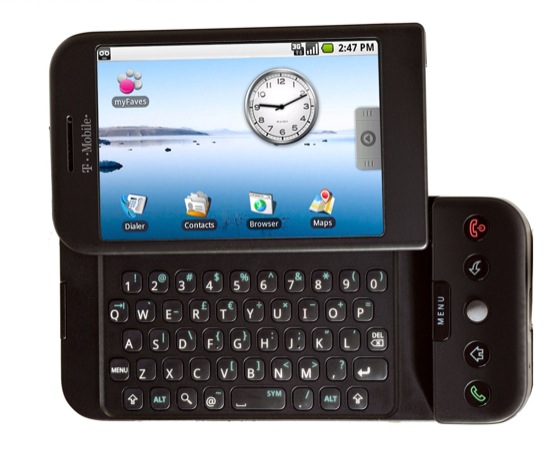
Tmobile G1 powered by Google's Android image

Tmobile G1 powered by Google

Will we start seeing these commercials soon?  With the release party of the Tmobile G1, an HTC phone (manufacturer), powered by Android (Google’s mobile OS) we just might.  The Google Phone is the direct competitor to the frenzy surrounding Apple’s iPhone.

YouTube Preview Image

The G1 is heavily subsidized at $179.99, and available today for pre-order on Tmobile’s site for existing customers.  (Apple’s least expensive iPhone is $199 today.)  The public release is October 22nd.

Techlife will be getting a G1.  Andy Rubin, got his start with Danger and the Sidekick, another Tmobile device recently purchased by Microsoft.  The similiar look and feel to the hardware is unmistakeable and the fact Tmobile is carrying the phone is a shrewd move as they might lose customers otherwise, and instead get “us” to upgrade.  It worked on this Sidekick user.

Eric from Google gives us an idea of how easy the phone is to use and how your data is safe.

YouTube Preview Image

Thanks to Gizmodo for the great live analysis.  Thanks to AndroidGuys for the link to the live feed.  Thanks to Lifehacker for some great Android information.

Techlife will be covering the G1 more as we get to try it out and use it day to day.  It is something these offices are eagerly awaiting. Something less covered but interesting to us is the Android and Google Docs interface.  Maybe some of our friends in the Google Docs group can shed some light on it.

Will you be upgrading to the G1? Let us know in the comments.

(more…)

Techlife has gone mobile. As Sidekick’s Blackberry’s gain in popularity we often get requests from readers to offer a quick loading mobile edition. When selecting our direction we wanted to make sure to provide the same great experience our readers have come to enjoy in the paper edition and full web edition.

As you can see from these screen captures it’s a pretty decent option. Please let us know if you find any browsers that have issues. The nice thing is it should auto-detect your mobile browser.

Pure Energy GoldPure Energy XL

As we manage the rising costs of business and energy I am reminded of a story, so sit back and enjoy Techlife’s tale of power.

The typical company rolls along putting out daily fires, and not giving employees the true time to make work a better experience. Most of you readers will skim over that last sentence just as easily. Let me repeat it, as it bears repeating. The typical company rolls along putting out daily fires, and not giving employees the true time to make work a better experience. Ah, you get it now? You think this is going to be another columnAuto Battery Starter about taking time to breathe, but you are wrong.

As we all coast along in work and life I want to share a small tale with you. Many years ago I learned of a new site, Woot, a site that sells one item a day. One day they were selling “Random Crap” (yes Woot faithful, this pre-dates Bags of Crap), so I took a gamble for $.03 and ended up with a variety of, you guessed it, “Random Crap.”

One item was an Auto Starter – Car Battery Charger. While reading up on this I learned that inside, this device was powered by AA alkaline rechargeable batteries. Hmm, interesting I thought. I could use some AA batteries, so I used a hammer carefully opened the case and found a small pot of gold.

Gleaming up at me were Pure Energy’s AA gold rechargeable alkaline batteries. And in typical story fashion our hero doesn’t really recognize the true power of his finding. I began using them and they were great, long lasting batteries. Of course, I forgot one thing. They were rechargeable and I didn’t own a charger.

Research online showed most chargers worked for various other types of rechargeable batteries, except alkaline. Then I found Kevin Kelly’s Cool Tools, article about the Battery Xtender for recharging alkalines. A bit more research led me to the Rayovac Universal Battery Charger.

I still use the batteries and the charger today nearly 4 years later. The batteries are long lasting like regular alkalines and the charger works for some other non-alkaline rechargeable batteries I now own. I decided to look for a few more Pure Energy batteries and found they have updated their technology, to the new Pure Energy XL Alkaline, which have:

…longer charge retention (up to 7-year storage life), higher battery capacity (rated at 2000 mAh), and overall up to 80% more service life (up to 500 cycles) compared to the original gold line.

My company has saved hundreds of dollars on batteries. I enjoy the power and durability of an alkaline battery and the eco-friendly ability re-charge again and again. Going green is easy! A happy ending to our tale.

So how does this relate to our statement: The typical company rolls along putting out daily fires, and not giving employees the true time to make work a better experience. As a consulting firm we often see valuable ideas employees have that are just not getting the attention they deserve. Our own cost-saving approach resulted in stepping away from the “fires” and being given the freedom to think, research and act.

We encourage you this July to think about Independence Day, truly as a day to provide co-workers the chance to make a positive independent change. And if you need a little kickstart, let us know.

How have you made a difference? Tell us in the comments.

Rayovac Universal Charger

TagCow LogoTechlife had the chance to try out TagCow, an automated photo tagging service, while it was still in beta. TagCow has now emerged from beta and is open to anyone. Automated photo tagging is equivalent to Google Search for your personal digital photos. From professionals to amateurs having quick and easy ways to sift through millions of images that are accurately tagged makes this service truly amazing.

What makes TagCow a bit more unique is the method of tagging, it is automated. Other services such as Picasa or Flickr rely on your efforts to tag photos, while Google is using a pseudo-game to help improve its tagging search results. This is what sets TagCow apart.

Tagcow’s “how” tagging is accomplished is a bit hidden on the website, but in speaking with Michael Droz, CEO and co-founder, he revealed it is part automated and part human-based. I would even venture to suggest different humans were assigned to my photos, as the results were slightly different for each image I uploaded. There was even a typo! Due to this tagging says it will take 24-48 hours, mine took about 55 hours.

TagCow's automated tags

(more…)

Google Docs Goes Offline - a Techlife Illustrated How ToGoogle’s inviting all their users to become trapeze artist’s and work without a net, an Inter-net connection. The innovation machine that is Google just keeps on rolling, and their newest trick is using a tool called Google Gears to let users work untethered.

One of the bigger drawbacks of Google Docs is now a thing of the past. Techlife Illustrated has put together this easy to follow guide to getting Google Docs offline. (This is our first Illustrated How To, leave a comment with your thoughts.)

Step 1

Step 1 - Techlife Illustrated - Installing Google Gears

While in Google Docs, in the upper right hand corner is a link to “Offline.” Which gets Google Gears on your computer.

(more…)

nuart 3 by Slinkachu

In Techlife’s day job we advise clients to, “Get a fresh perspective, take a unique look at things.” Most of the time clients ask us for help in this effort. After all, it isn’t easy to achieve a fresh perspective, but when you do, LOOK OUT! because the effect can be startling and eye-opening.

nuart 7 by Slinkachu

We love that feeling. When the world turns over on itself. It is exciting to realize things can be different with just a shift in perspective.

Dear Son 1 by Slinkachu

For a few years, an artist in London, known as Slinkachu has been providing a fresh perspective on life, by placing his art all over the city without permission and then photographing it. Interesting you say, but how does that provide a fresh perspective? View the following pieces and then keep reading and see how your perspective changes.

(more…)

OLPC on 60 minutesWayan Vota from OLPC News

While writing a recent article, on the OLPC XO Laptop, one of the all time most popular articles on Techlife, we got to meet Wayan Vota the founder of OLPC News. Wayan’s a strong, independent voice in the community of OLPC and the XO Laptop. He was featured on 60 Minutes for his work. (see 7:06 mark on Techlife TV for Wayan) I appreciated his grasp of both technology and non-profits and how the two mesh, so we sat down with him to learn more about what makes Wayan tick (tick, tick.) (unabashed 60 Minute pun for the OLPCNews readers who know me.)

YouTube Preview Image

Lesley Stahl discusses the 60 Minutes piece on the OLPC on Techlife TV.

Techlife: Wayan Vota. Interesting name, what are the origins?

Wayan Vota: Born on Bali to hippie folks. Got a local name in the process.

TL: Why did you start OLPC News?

WV: In the summer of 2006 I noticed there was much hype around OLPC, but little thoughtful analysis of its proposed methods and assumed impacts. I wanted to explore the details of OLPC’s implementation plan – how it expected to actually get laptops in the hands of children worldwide – in public form of open commentary and discussion. With ~5,000 daily readers, over a dozen writers, and too many contributors to count, I feel that OLPC News is successful beyond my wildest dreams.

(more…)

CentSports - Bet on sports

People everywhere are excited for MLB’s Opening Day. It is a day when everyone has a clean slate. Everyone has an even shot (at least the media gives that impression.)

We all know the owners and players are in this to get paid. Well once again, loyal reader Dan writes in with an Opening Day gem to give Techlife readers their shot at a payday. (Pete Rose, this one’s for you!) I was a bit skeptical at first, but it’s free money and fun too. Nearly as good as fun at the old ballpark.

CentSports is a new kind of social gaming site where you risk nothing but can win real money. First off the site gifts you $.10 to bet on sports. Lose that and get another gift of $.10 and so on. (Yep, they are unlimited in their generosity.) Start winning and you can cash out as soon as you reach $10. Sound to good to be true? Sounds more like spam you might get, right? Trust Techlife it isn’t. It is actually a lot of fun

Do you like hardwoods, frozen ponds or field of dreams? CentSports has NCAA, the NCAA Tournament, the NIT Tourney plus the full slate of NBA games. They also have NHL hockey and starting today they have baseball’s MLB all ready for Opening Day action. They are planning on adding soccer and bringing back boxing and tennis. (Apparently those pesky tennis players will retire mid-match which screws up the betting a little.)

As a person with little knowledge of sports betting it is a lot of fun to learn on someone else’s dime (pun intended). They have all the standard bets including point spread, money line, over/under and let you parlay or combine these bets to get higher payouts.

The best part is the social aspect of the site. You can see what others bet, invite friends, publicly chat about each bet made and send private notes too.

How can CentSports fund the payouts? Advertising. They have a unique feature after placing a bet you will get the chance to see an ad which can give you bonus cash if you win. (Hint: Always hold out for near the top tier of the bonus.) There are other ads scattered around the site as well.

Overall: If you like sports and are too chicken to try using your own money, you can’t lose. Literally! CentSports is sports gambling for the rest of us. No skill required.

I hope you try it out and see if you can beat me, I was up to nearly $2. Let us know in the comments what your user name is and we can add you to our friend list on the site.

Next Page »