Mobile


We* are hobbyists just having fun developing for Android, but Google sure knows how to make our day.  Check out the email we got.


From: Android Market
Date: Tue, Mar 2, 2010 at 3:46 PM
Subject: Device Seeding Program for Top Android Market Developers
To: rdrr.labs@gmail.com

Subject: Device Seeding Program for Top Android Market Developers

Due to your contribution to the success of Android Market, we would like to present you with a brand new Android device as part of our developer device seeding program. You are receiving this message because you’re one of the top developers in Android Market with one or more of your applications having a 3.5 star or higher rating and more than 5,000 unique downloads.

In order to receive this device, you must click through to this site, read the terms and conditions of the offer and fill out the registration form to give us your current mailing address so that we can ship your device.

You will receive either a Verizon Droid by Motorola or a Nexus One. Developers with mailing addresses in the US will receive either a Droid or Nexus one, based on random distribution. Developers from Canada, EU, and the EEA states (Norway, Lichtenstein), Switzerland, Hong Kong, Taiwan, and Singapore will receive a Nexus One. Developers with mailing addresses in countries not listed above will not receive a phone since these phones are not certified to be used in other countries.

We hope that you will enjoy your new device and continue to build more insanely popular apps for Android!

(email links removed)

RDRR Labs has:

Timeriffic with near 4.5 stars and way more downloads.
24 a beta app has 3.8 stars and way more downloads.
Brighteriffic has near 4 stars and way more downloads.

*Update 1: “We” means, a friend who does the code and Techlife’s lead writer who does visual design for Android apps.

Blackberry Keypad by Mark Iafrate vs.   toilet by István Benedek

Dear Techlife,

I was in my office, my second office, and it happened.

My precious smartphone, tumbled out of my hands, bounced off my leg, I reached for it and it grazed my fingers.  I watched in horror as it gyrated like a diver in the Olympics and did a perfect entry, with little splash at all, but a resounding, plop into the watery depths.

I shut my eyes, muscled up the courage and reached my hand into….the toilet.  My goal, rescue my precious smartphone from what must be a Blackberry grave.  Wow that water was ice cold.

As I expected the poor baby was dead.  I am distraught, what can I do?  How can I dry my wet phone?

Sincerely,

Deep Bowl Diver aka Fumble fingers

Dear Fumble Diver…

It’s not as bad as you would think.  As you might imagine you aren’t the first to drop an electronic item in water, or more specifically a phone into a toilet.  Shh…it happens, to everybody, well not me, but everybody else.

Even better there is a solution to easily and cheaply dry out your phone!

Will the solution work for you or any of our other readers is clearly a case by case basis, but the solution is pretty simple.  Rice.  Yes, rice.

Blackberry Keypad by Mark Iafrate +  toilet by István Benedek =  Rice bowl by Lali Masriera

Rice cooks in water by absorbing the moisture it is sitting in, like a sponge.  To dry your smartphone try these simple steps:

  1. Open the phone, if possible (iPhones exluded.)
  2. Remove the battery, SIM card and storage card.
  3. If it is a clamshell, open it fully.
  4. Pour uncooked white rice into a bowl.
  5. Submerge phone, battery, sim and storage cards in bowl of dry rice completely for 3 full days.
  6. Remove, reassemble and power on.

Your luck will vary based on many factors, including the length of time the item was submerged.  Also before you call your carrier and claim, “It just stopped working. I don’t know what happened.”  All mobile phones have liquid activated stickers inside them in a few places.  This helps a technician know if you have had water damage normally not covered by your warranty.  So Fumble Diver, try the rice first, you already voided your warranty.

Finally, a quick comment about the bathroom referred to as your second office.  I am sure there are plenty of readers who nod their head in acknowledgment of that reference.  Newspapers, books, magazines are commonly brought to the office bathroom as a place to get some reading down.  You might call it multi-tasking.  A bit of office bathroom smartphone etiquette:

  • silence your smartphone in the bathroom
  • no calls in the bathroom

Follow these two simple rules and we won’t have any problems.  No one wants to hear you jabbering away about how some widget will be delivered on time or how your weekend drinking binge turned out.  We also don’t want to hear you playing Pac-man or Bejeweled.  Spare us your awesome dexterity.

Author’s note: Great news!  Fumble Diver reported back before we went to press.  After just 1 day, the phone was powering up and working but had water spots on the LCD screen.  That’s when we reminded Fumble Diver about step 5, part 2 – 3 full days.  Do you have a way to beat the smartphone blues?  Tell us.

YouTube Preview Image

Today marks a new carrier, Verizon coming on board with Android with two new devices under their Droid line.  The Motorola Droid and the Droid Eris by HTC are sure to be holiday hits, and when people start looking for good apps from the Anrdoid Market, Techlife wants to make sure you have our top 10.

Our friends at Phandroid, started this idea with 5 people listing their top 10 apps so we thought we’d weigh in with our own list.  This is done in that format, with a bonus app!

marketbagtimerifficweatherwidgetultimatefavesvisualvoicemailmobiledefense

Long time Phandriod/Android Forum guy, using a G1 since the start…here’s my top 10.

1. Timeriffic – FREE – control wifi, brightness, audio and more with a simple timer, saves your battery. (full disclosure I collaborated on this)

2. Weather Widget – FREE – Beautiful weather app, with great options. This sits on my main home and I use it all the time.

3. UltimateFaves – FREE – Creates a quick 3D Ring of anything you want a shortcut too, calling people, applications, your choice. Unique interface.

4. Visual Voicemail – FREE – Does what it says, constantly working on it and updating, very responsive devs.

5. Mobile Defense – FREE – Find (gps), disable and more for your phone (USA only). I hope I never need it. Also is stealthily hidden.

chompsmssmspopupcestosimeembatterywidgetwallr

6. ChompSMS – FREE – SMS replacement with an iPhone style chat interface

7. SMS Popup – FREE – Wakes phone display and plays audio and shows a small overlay of the most current SMS message. Flawless.

8. Cestos Full – FREE_- Multiplayer online game, arcade style, if you have a few minutes, it’s great. Good community too, with built in chat.

9. iMeem – FREE – Great web streaming radio customizable. Like Pandora, but without choppiness and massive battery drain. Albeit a slightly smaller catalog and some battery drain.

10. Battery Widget – FREE – easily see your exact % of juice left. Pressing the widget offers up toggle settings for a few options too.

Bonus App – Wallr – FREE – For those wanting a low resource option for changing their look, this app looks in a designated wallpaper folder and will randomly select a new wallpaper, on a schedule you set up. Mine is 1 per hour.

Thanks to our friends at Androlib.com for links, and images.

The Dojo's Cubed Addict - Multiplayer Real Time game for Android, Mac, PC and Linux.

The Dojo's Cubed Addict - Multiplayer Real Time game for Android, Mac, PC and Linux.

As we meet with client’s the hardest thing for them to wrap their arms around is that on the web, your business is instantly global.  “Awesome, bring it on.”  “Yeah, so, no big deal.”  These are some of the common answers we hear from client’s.  It is then we sit them down and using their enthusiasm or lack thereof, we coach them on doing business in a global economy.  It’s not always easy with i18n (shorthand for internationalization) and l10n (shorthand for localization) and social networking and web 2.0 and e-commerce.

Now imagine adding mobile customers to the mix.  That is exactly the challenge David Kainer of The Dojo experienced.  Provide his customers a gaming platform globally that easily works for all mobile devices and Linux, Mac and Windows computers (<=computer download link, start playing today) based customers.  He also added in multi-player real-time , and to top it all off…it is all FREE.

Techlife sat down with David, who from his Sydney office, works with the London office to learn about The Dojo.  How?  Why? How hard?  It’s all in there, and we even cover why he chose Google’s Android first over Apple’s iPhone. 

Techlife: What is The Dojo?

David Kainer: The Dojo is a global platform for uniting game players in interactive gaming, irrespective of platform. It’s aim is to provide great multi-player experiences on mobile and online and really begin to blur the boundaries between the two. Best of all – it’s free.

T: How did you come with the idea for The Dojo?  Was it based on something?

(more…)

Virtual G1: Take it for a Test Drive

How can I possibly buy a phone I have never seen? This is the number one question people ask when talking about the Android G1 or Google Phone with me.  The G1 folks have addressed this with Virtual G1. The virtual 360 degree G1 that rotates and opens to show off the full keyboard.  A guide view showing you where the battery and SIM card will go.  Best of all, an emulator view built in Flash to let you examine the software and hardware of the G1 in action.

The emulator is limited in many areas of function and there is no sound for any action.  It gives a good feel for what the device will do, at least to hold people over until the Tmobile release on October 22nd.

Thanks to Gizmodo and Engdaget for the fun tool.

“Hello, I’m a Gphone.”

“Hi, I’m an iPhone.”

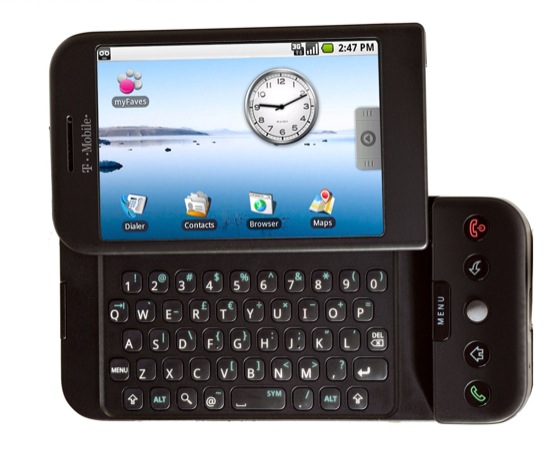
Tmobile G1 powered by Google's Android image

Tmobile G1 powered by Google

Will we start seeing these commercials soon?  With the release party of the Tmobile G1, an HTC phone (manufacturer), powered by Android (Google’s mobile OS) we just might.  The Google Phone is the direct competitor to the frenzy surrounding Apple’s iPhone.

YouTube Preview Image

The G1 is heavily subsidized at $179.99, and available today for pre-order on Tmobile’s site for existing customers.  (Apple’s least expensive iPhone is $199 today.)  The public release is October 22nd.

Techlife will be getting a G1.  Andy Rubin, got his start with Danger and the Sidekick, another Tmobile device recently purchased by Microsoft.  The similiar look and feel to the hardware is unmistakeable and the fact Tmobile is carrying the phone is a shrewd move as they might lose customers otherwise, and instead get “us” to upgrade.  It worked on this Sidekick user.

Eric from Google gives us an idea of how easy the phone is to use and how your data is safe.

YouTube Preview Image

Thanks to Gizmodo for the great live analysis.  Thanks to AndroidGuys for the link to the live feed.  Thanks to Lifehacker for some great Android information.

Techlife will be covering the G1 more as we get to try it out and use it day to day.  It is something these offices are eagerly awaiting. Something less covered but interesting to us is the Android and Google Docs interface.  Maybe some of our friends in the Google Docs group can shed some light on it.

Will you be upgrading to the G1? Let us know in the comments.

(more…)

Internet access has become a part of our daily life and sometimes just cause you are away doesn’t mean you should be without. We had the pleasure of trying out internet access on the go and Techlife readers won’t be disappointed.

(part of the syndicated print column’s writing process exposed to online readers)

Techlife hits the road every so often for time away from our main office. In the past our mobile smartphone was the only link back to the office. As we await the HTC Dream, an Android powered smartphone from Tmobile (Editor’s note: this was just given the greenlight!) and Google, we find more and more reason to stay connected using a laptop with broadband access.

YouTube Preview Image

For a recent trip to a tiny coastal getaway, we did a quick check of free wi-fi, and pay-as-you-go wifi and came up empty. But this lack of wi-fi turned into the ultimate turn of good fortune.

Techlife got to try two amazing services, Verizon Mobile Broadband and Rovair. Verizon has had mobile broadband, in the form of a card or USB for laptops for a few years. Rovair is a startup offering a turnkey solution for renting broadband cards and a data package.

We visited Rovair’s site a few weeks prior to travel to rent our card. Prices vary based on length of time and they do offer rush processing. We initially chose “let Rovair select broadband for me” which lets them choose between Sprint and Verizon. They do offer links to both Sprint and Verizon coverage maps for mobile broadband. In the long run we ended up with a Verizon card. (see below)

Their staff answered questions quickly and was helpful in explaining we needed to download some software from Verizon. The software was available for Mac and PC. When the card arrived, it plugged right in and a few moments later the laptop was on online. Easy.

We of course put the card through its paces by working in the car on the way, and then once we arrived. Verizon’s service was so fast and easy that if not for their monthly limits, of 5 GB data usage, it might be a perfect permanent (in the office) new option for us. Before we knew the limitations we considered a mobile broadband router, as we could pop out the card to use while on the road.

Rovair passes on the limitations to 1 GB per week of rental, pro-rated for rentals of less than 1 week. As heavy users we came just shy of 1 GB of usage in much less than a typical work week, after all it was a vacation. We were also cautious to not stream video or music and we still came pretty close.

Returning the card to Rovair was easy, just drop it into the provided UPS envelope and drop it off. We were a little sad to see the card go. We will be certainly considering Rovair in the future for our traveling needs. It really makes a world of difference.

And if Verizon changes their plans for heavy users we might consider a card for the office.

Overall: Rovair makes renting mobile broadband easy. While not likely cost effective for the casual user, any small business owner who wants to be connected while on vacation, on-site, at a trade show or sales meeting should consider renting their high speed access. Request Verizon as friend who rented disliked the Sprint coverage in their area.

Have you ever used your cell phone tethered as a modem? Let us know in the comments . Was it easy? Fast?

Techlife has gone mobile. As Sidekick’s Blackberry’s gain in popularity we often get requests from readers to offer a quick loading mobile edition. When selecting our direction we wanted to make sure to provide the same great experience our readers have come to enjoy in the paper edition and full web edition.

As you can see from these screen captures it’s a pretty decent option. Please let us know if you find any browsers that have issues. The nice thing is it should auto-detect your mobile browser.

OLPC on 60 minutesWayan Vota from OLPC News

While writing a recent article, on the OLPC XO Laptop, one of the all time most popular articles on Techlife, we got to meet Wayan Vota the founder of OLPC News. Wayan’s a strong, independent voice in the community of OLPC and the XO Laptop. He was featured on 60 Minutes for his work. (see 7:06 mark on Techlife TV for Wayan) I appreciated his grasp of both technology and non-profits and how the two mesh, so we sat down with him to learn more about what makes Wayan tick (tick, tick.) (unabashed 60 Minute pun for the OLPCNews readers who know me.)

YouTube Preview Image

Lesley Stahl discusses the 60 Minutes piece on the OLPC on Techlife TV.

Techlife: Wayan Vota. Interesting name, what are the origins?

Wayan Vota: Born on Bali to hippie folks. Got a local name in the process.

TL: Why did you start OLPC News?

WV: In the summer of 2006 I noticed there was much hype around OLPC, but little thoughtful analysis of its proposed methods and assumed impacts. I wanted to explore the details of OLPC’s implementation plan – how it expected to actually get laptops in the hands of children worldwide – in public form of open commentary and discussion. With ~5,000 daily readers, over a dozen writers, and too many contributors to count, I feel that OLPC News is successful beyond my wildest dreams.

(more…)

Reading by Christine RondeauThree of the biggest areas in tech are Gaming, Mobile and Computing. This past month tackled this three ring circus in Techlife’s online blog. We covered a Nintendo Wii tip for the gamers, Techlife TV had video preview of Google’s Android mobile phone operating system and finally we took a diversion to a special kind of computing. If you haven’t visited, check out Techlife online.

At Techlife we often advise clients that giving back to the community is not just good PR. It can really impact employees and your business in many ways. I personally have a variety of organizations that I donate my time towards and the rewards truly are amazing. A recent story once again reinforced it pays to do good. It’s called karma people.

Techlife OLPC XO Laptop Gallery

As loyal readers know Techlife is an early adopter, but we don’t always write about things immediately. Our readership appreciates the pace, as the our reports give a real “lived in” flavor. For example we have had a Nintendo Wii in our office for well over a year, as we snagged one early on. But our first Wii article was about something that puzzled us, and we thought might help others.

We have had an OLPC XO Laptop (One Laptop Per Child) in our offices since late last year. For those unaware, these are those little green laptops originally billed as the $100 laptop (ended up closer to $200), and intended for children globally, but with special focus towards countries where computers are few and far between. The idea that if children had the chance to use a computer regularly, their own computer, they would grow up and be able to implement technology into their country with more ease. A noble pursuit.

Click “more” to read how the OLPC XO Laptop Saved the Day… and see the image gallery.
(more…)

YouTube Preview Image

Techlife TV has a double feature today with videos on Android the Google operating system for mobile phones. These videos demo simple text messaging and chat, rendering of the earth, the videogame Quake, Google Maps and Street view and much more.

As a long time user of the Sidekick by Tmobile, also known as the Hiptop, Techlife TV was excited to see Apple’s iPhone be released and now Google’s Open Handset Alliance operating system Android in the wild. These mainstream devices will help provide competition to RIM’s Blackberry Operating System and Microsoft’s Mobile platform along with the other manufacturers of smart phones like Nokia and Palm. It was interesting to see Microsoft buy Danger the makers of the Sidekick mostly because Danger founder Andy Rubin left a few years ago to form a company acquired by Google and now turned into Android. So all this means more for the consumer.

Which smart phone will win is anyone’s guess? But with Apple moving into the top ten in sales of the iPhone it will be exciting to watch the future unfold in this segment of the marketplace.

Google’s Andy Rubin demos Android for the BBC – Blip.tv video via Gizmodo

Miami Heat's Dwayne Wade Sidekick 3Google Docs and Spreadsheets new main interfaceiPhone image courtesy of WiredTechlife readers know I am big fan of Google Docs. Even Google knows. It is a great tool for collaboration. I also use a Sidekick from Tmobile, and today those worlds collide with the introduction of Google Docs Mobile. Google Docs for your mobile device, also works on such smart phone platforms as iPhone, Blackberry or Windows Mobile but as this reviewer says it is really Google Docs Mobile Viewer.

On the Sidekick you need to enable Javascript, which is common enough. The main page where all my recent docs reside is a great adaptation for the mobile device. It really lets me see the important things quite easily. That is where the goodness ends. The only somewhat manageable document type is a word processor to view mobile. The spreadsheet gives such a small view that it is really unusable and their brand new presentation tool does not work.

Now we all know that Google will evolve this toolset, as they are prone to do. And with the recent announcement of the gPhone being produced, it is clear their next area of growth is mobile. This offering could have been in the labs a few more weeks because my initial excitement was quickly replaced with disappointment at only having “real” access to my word processing documents and here’s the biggest surprise. No edits!

They opted to leave out the capability to edit in this early alpha beta release, which is a big disappointment. What mobile have you tried it out with?

Thanks to Lifehacker for the post.

advance pennsylvania payday loanin advanced loans check idahoin bankruptcy after auto loan ohioaid student loan federalaid loan studentpersonal chart amortization for loan16 direct com payday 11 loanloan finance household insurance 121bad with 20000 credit personal loanspersonal loan 000 30 unsecured

Popular Photography and Imaging American PhotoBlogging is a pretty cool way to write my syndicated column. Recently other peers in MSM (Mainstream Media) and the blogosphere have been taking notice of Techlife. Our recent brush with the paparazzi came a bit more literally. “Popular Photography and Imaging” magazine and it’s sister publication “American Photo” magazine each have a blog.
In a recent post on the blog PopPhoto.com| FLASH they wrote about the DIY project How to make a LifePoster with Picasa article. They added this great idea:

Pop Photo Blog

…use this technique with camera phone images. Most images from phones are far too low of a resolution to do anything with except create avatars or use as backgrounds on your phone. Using this technique, you can gather a bunch of images from your phone (or many phones over the years) and compile them together into a very printable poster that you can hang.

manalapan ocean 820 southporn demand on adult video vod2 sexvilla 3dporn links amateural4 pornbodies sexiest celebrity 10134dd teenabusive sex Map

Next Page »