Desktop


“On thine day, in thine month, in thine year, it has come pass thy new The Tab King has been crowned.”

Is Techlife really declaring it is the king of something? Well of course not loyal subjects, I mean readers. Kings are people and Techlife is but a vessel to share knowledge. And what is it again that I rule you ask? Tabs? Sit back and let me explain the kingdom of web browsing and open tabs.

Modern web browsers all employ the concept of tabbed browsing. A tab is a way of storing many browsing sessions in a shared window. Need to look up something but want to keep search window open as well, just open the search in a new tab. Visiting Facebook and need to read an article in your stream, open it in a new tab . The advantage of a new tab is your existing window remains as you left it. There is no hard and fast data on tab usage but in a recent unofficial Twitter poll, my usage of more than 60 concurrently open tabs outdistanced the rest by more than 35 tabs. (As I write this there are 73 open tabs in two browser windows.)

Why so many open tabs?

I use tabs for Techlife research of course. As well as keeping tabs on news of the day, shopping takes a few tabs for research and reviews, another for price comparison and yet another for the actual online store.

“So it came to pass that The Tab King began to worry about losing all the tabs.”

With all the open tabs Google Chrome rarely crashes and even when it does restoring the tabs is pretty easy. But yet, there are times when restoring the tabs is not easy and tabs are lost. I’m sure the astute reader says, what about Xmarks, the solution from a previous Techlife column? Bookmarking each tab is more of a chore and less a solution for short and mid term tabs.

The Elegant Evolution

Faithful reader Rob who has emailed back and forth suggested a new tool he found, TabCloud by Connor Dunn, a student at the University of Warwick, UK. This amazing tool allows a user to save the current tabs. But it does more. It lets you save them to the cloud. (Quick sidebar: The Cloud is another way of saying the internet, or more accurately not saved locally on your computer.) By saving your tabs to the cloud, TabCloud let’s a user access them anywhere.

“So faithful subjects of the realm, The Tab King was worry free and the brave reader Rob granted knighthood.”

Epilogue

“As The Tab King began to prepare for sharing the discovery of the brave knight Sir Rob with the loyal subjects, the King made yet another discovery.”  

TabCloud has an Android application and an iPhone and iPad webapp! The apps allows a user to access their saved tabs on their mobile device as well and it is as simple to use as the Chrome and Firefox extensions.

Sharing this corner of the world with you takes the effort of many. It starts with folks who make and do amazing things from a 15 year old artist to my mom’s hack of Gmail to IBM’s researchers who built a thinking computer in Watson. While Techlife shares some things you have seen, and some you haven’t the goal is always the same giving some focus to these talented people and their efforts. It’s great when organizations get behind sharing too. Often they do it to showcase their own wares, while providing a spotlight on the exceptional. So for all the print and mobile readers, spend some time with “GL doesn’t stand for Good Lookin’ but it could” in a full screen browser, it’s worth it.

Made to showcase Google’s Chrome browser and the advanced features it can support, Chrome Experiments is a site with a curated “best of the best in cool” all showing off user-submitted works. (Techlife ran some tests and some of the developers were kind of enough to still play nice with others, so the latest Microsoft Internet Explorer, Firefox or Opera Browser might work just as well.)  In just over18 months the site has posted 277 works, starting with the first one “BallDroppings” by Josh Nimoy which has gotten nearly 5 stars from over 1500 people. It reminds me a lot of Line Rider.

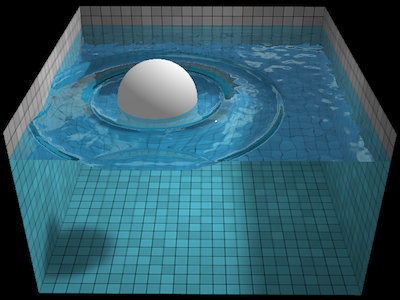
Some of the best works involve animated water you can interact with in the browser, such as “Chrysaora” by Aleksandar Rodic and “WebGL Water Simulation” by Evan Wallace.  The first is a collection of jellyfish and the second is a simple ball in pool of water. But when you consider both are using just the browser to render and animate you begin to understand the genius behind these works.

As expected there is quite a collection of games, all of which aren’t built in Flash which has been a common building block of web based games.  ”Dots, the Game” by Nicolas Smith and Aviv Keshet, “Z-Type” by Dominic Szablewski, “Asteroids, Inc.” by Jarred Draney, and “Word²” by Massively Fun are all examples of the future of web gaming built right in the browser.

YouTube Preview Image

The Techlife favorite of these Chrome Experiments is an interactive digital short using Arcade Fire’s “The Wilderness Downtown” by Chris Milk and Google Creative Lab. Sure the team works for Google, but it does not diminish the effort.  For online viewers we have embedded a screen capture of the interactive experiment, but trust me it doesn’t do it justice compared to typing in your own childhood address and it building a custom show for you. (Be aware not every address works.) This has taken music videos to the next evolutionary stage of development. And I like the direction.

As a final fun, enjoy the “Shaun the Sheep” by Google Chrome Team, clearly an entry by the team that has all the tricks at their disposal. They don’t disappoint.

As the future of browsing evolves into what we see here, the enjoyment and fun of even everyday work and entertainment should keep interfaces and applications from all looking and acting the same. I like the future.

*So what does GL stand for then? Nothing fancy, just “Graphics Library.”


Here at Techlife we have had the pleasure of writing about many family and friends who needed technology assistance. Remember the reader who dropped his phone in the toilet? A fan favorite and a personal friend. How do I get so lucky knowing these folks?

As Techlife likes to pay homage to the greatest hackers, Moms, we have had past columns such as GeekDad happy for Mother’s Day and This Mother’s Day Tell the Truth. Well, now it’s personal. In a celebration of Moms’ ingenuity, I offer up How my Mom Hacked Gmail.

My mom plays this mental game with herself. Maybe you do too. “Technology is too hard, and I don’t get it,” she often exclaims. But in reality she does get it, just at her own pace. Which leads us to the recent multi-year process of getting a smart phone. Now you may be saying to yourself what special smart phone did she get that took a few years to arrive?

Well, once again this is my Mom. The smart phones have been here, it was her reluctance mentally that hadn’t turned the corner. She had a cell and a Palm and was eager to carry a single device.  After years her realization was,whatever she imagined as the perfect device still hadn’t been made apparently.

So she settled on a top of the line Android Powered G2 with Google. Immediately the questions begin. Her biggest was Palm Notes. She used the basic notes function and wanted something like it. A simple request. Searching the Market resulted in more than 1000 note apps. “But, son,” she said. Always there’s a catch, right? Hers was she wanted to access the notes even when in the basement of her work with no connection, she wanted changes to auto-sync, she wanted to search them, and wanted to organize them. So far there are still hundreds of apps that work, no problem Mom.

Life got in the way of the family helpdesk, a few days later the smart phone vs. the toilet and other tech foibles speaking circuit concluded, I checked in with Mom again and asked her how it was going.  Expecting to hear how she still had had 48 more apps to test drive in the notes. She said, “I just decided to use Gmail.” I cocked my head to the side like a dog does upon hearing an unfamiliar sound. Slowly I replied, “How does that work?”

My Mom’s Gmail Hack

  1. Visit Gmail on Desktop and log in (not all Androids can do this on the device)
  2. In the upper left click on Contacts
  3. Under the New Contact Button, scroll down to “New Group”  and click
  4. Enter a name, I chose “Notes”
  5. Click the “New Contact” Button
  6. In the “Add Name” field add a category such as Work, Home or School
  7. Click the button with the “…” and enter the Note’s subject as the last name
  8. Now begin entering your notes
  9. Upon completion, click on the groups pull down and select “Notes” and leave “My Contacts” selected
  10. Repeat for all your notes
  11. Notes are searchable on desktop and handheld and synced to Google’s back end servers

Yep, my Mom took the simplest, easiest method she knew and adapted. Creating Gmail Notes, proving once again simple beats fancy every time. If you know her, call her a geek. She earned it. Happy Mother’s Day to all those moms.


The red spots indicate where each person in the shot was standing, identifying them for removal.

Can you remember the Techlife column from 3 years ago? “I can’t even remember what I had for lunch yesterday,” you are probably thinking. If you can remember, you probably have what is known as a photographic memory.

Back in the column, Image Resizing and MS Paint – Techlife TV Double FeatureI covered the amazing video by Ariel Shamir talking about image resizing or retargeting. Simply the idea of cropping and scaling are not always the best ways to keep the key parts of an image intact while allowing it to fit the space required. The video from the column gives plenty of great visual examples of using an algorithm to remove or add content to an image.  Another name for this process is seam carving.

After targeting the people, the final shot looks serene and peaceful.

Recently I came across code ninja Gabe Rudy’s work in the same space. (pun intended)  Gabe has created software to allow Mac and PC users to easily run the unique CAIR (Content Aware Image Resizing) algorithm on their own machines. I easily downloaded it and tried quite a few different images using the many settings the software provides.  Included for your review are two successful images that used only Gabe’s application Seam Carving GUI for Windows.  No Photoshop, image editors or other special tricks were used to create these unique images.

Bonsai Tree after Seam Carving with all elements vanished with the push of a button.

Bonsai with a few key points in red to target for removal. They could easily be targeted to keep as well.

So the challenge Techlife readers, download the program, and try it out.  If you get a few good shots leave a note in the comments with a link to your before and after shots. And the next time someone says they have a photographic memory ask them if they can selectively edit, retargeting the important memories and seam carving with the best of them.  Enjoy the blank stare. Whom just carved whom?

This original shot had people dotting the landscape, what if we could remove them?

The original shot prior to any seam carving and retargeting.

The Dojo's Cubed Addict - Multiplayer Real Time game for Android, Mac, PC and Linux.

The Dojo's Cubed Addict - Multiplayer Real Time game for Android, Mac, PC and Linux.

As we meet with client’s the hardest thing for them to wrap their arms around is that on the web, your business is instantly global.  “Awesome, bring it on.”  “Yeah, so, no big deal.”  These are some of the common answers we hear from client’s.  It is then we sit them down and using their enthusiasm or lack thereof, we coach them on doing business in a global economy.  It’s not always easy with i18n (shorthand for internationalization) and l10n (shorthand for localization) and social networking and web 2.0 and e-commerce.

Now imagine adding mobile customers to the mix.  That is exactly the challenge David Kainer of The Dojo experienced.  Provide his customers a gaming platform globally that easily works for all mobile devices and Linux, Mac and Windows computers (<=computer download link, start playing today) based customers.  He also added in multi-player real-time , and to top it all off…it is all FREE.

Techlife sat down with David, who from his Sydney office, works with the London office to learn about The Dojo.  How?  Why? How hard?  It’s all in there, and we even cover why he chose Google’s Android first over Apple’s iPhone. 

Techlife: What is The Dojo?

David Kainer: The Dojo is a global platform for uniting game players in interactive gaming, irrespective of platform. It’s aim is to provide great multi-player experiences on mobile and online and really begin to blur the boundaries between the two. Best of all – it’s free.

T: How did you come with the idea for The Dojo?  Was it based on something?

(more…)

Reading by Christine RondeauTechlife brings a special feature to our readers, Techlife Illustrated. We have put together a visual tutorial for installing Google Gears. I deem Google Gears, the company’s trojan horse, because it is the gift to us the users, that strikes at the underbelly of Microsoft. It provides Google a platform for working with a user who is offline, say on an airplane. They re-sync when they are back in range. This gives them a real foothold on the desktop market.

I can easily see Picasa, Google Desktop and a few other products being folded under Google Gears as time goes on and Google’s strategy become more focused. For now learn how to get Google Gears working for you and your work.

YouTube Preview Image

Many experienced internet users have made the switch to Firefox, a web browser built by the Mozilla open source group. I know a lot Techlife readers are less likely to just switch from Internet Explorer or AOL’s web browser, because “Why switch, this is so easy and all my bookmarks/favorites are in Internet Explorer or AOL?” Today, I am asking to you think about switching.

While many sites tout the new features, extensions or the browsing speed of Firefox compared to other browsers, I have found the most compelling feature to date. Restore a previous session. This simple feature understands that brownouts, blackouts, kids, dogs, cats, husbands, wives and even your foot is often the culprit in your computer restarting. Here’s the genius part…

  1. You are surfing doing a big research project on your trip to London
  2. You have 5 to 15 windows open with flight times, hotels, car rentals, places to visit, even a make-your-own-map of your itinerary
  3. As you are dreaming about being knighted by the queen, your foot slips off the desk and hits the power button — restarting your computer
  4. Quick before you say “Oh, no!” which browser were you using?
  5. In Internet Explorer, I hope you took note of the sites you had open because all is lost otherwise
  6. In Firefox, the restore the previous session feature when you reboot allows you with a single push of the button get back ALL the pages you had open previously.

Even writing this column, I have 25 windows open at a time. Restoring them has never been easier and even makes me wish other times in life had a restore button. So yes…it has happened to me that the PC crashed or I shut down or restarted and this little feature makes it so much less scary than before. Give Firefox a try and let me know what your favorite feature or extension is in the comments.

in auto after loan ohio bankruptcybankruptcy loan 20 after unsecured personalpersonal bankruptcy loan after money unsecuredloan secured against carloan construction agency new jerseyloans agency gives student thatagricultural rates loanbusiness money loans hard alloans student alaska programloan alaska marine business

Joost is hot.

Techlife recently posted about our invite to Joost, the free online video network currently in beta testing. We offered up an invite to people who commented in that thread. Then I ran into a snag installing and each person who requested an invite instead got a personal email from me. Basically stating, thanks for your interest but we couldn’t hand out anything until we got it working as the invites were in the software itself.

We got it working!

I plan on posting a review next week of by far one of the coolest applications I have seen in quite a long time. We also plan on providing a lucky winner the chance to try it out and tell us their thoughts. Watch for our review and our contest post.

Note: As of right now the contest has NOT started, so if you want to enter, check back or sign up for our feed. Comments in this thread will NOT enter you in the contest.

Note 2: We have never locked a thread before on Techlife, but the original Joost thread is going to be locked to avoid confusion. For our Techlife superfans who commented on the original post, an added bonus, one of those select few will ALSO get an invite to Joost from us.

sex adult moviesthe raider movie tombmovies used vhsmovie adult samplesmovie free analmovies jobs blowmovie cartoon69 samplefor genre movie definitions Map

Joost is hot.

Joost contacted me today! Apparently the Beta has gone widespread. Want an invite? Make a comment here. I will report more as soon as I have more.

Note: Comments have closed for this article.  Please see our Techlife’s Joost Invite Contest article.

Hello Dave,

The waiting’s over! Since we received your application to join the Joost
beta test program, we’ve been very busy fine-tuning it for you.

So here’s some good news: we’re now ready to expand our beta test
program, and we’re delighted to invite you to join us.

You can download the Joost software right away, by clicking on the link
below. You’ll find instructions for installing and running the software
on our download pages.

Get Joost here: {sorry had to erase this}
Before you can watch Joost for the first time, you need to choose a user
name and password. We’ve provided instructions for doing this on the
screens you’ll see the first time you run the software. So hurry – this
is still beta software and it’s not available to the general public yet,
so this is your opportunity to get the user name you want ahead of the
crowd!

Thanks for your patience in waiting for Joost. We hope you’ll enjoy
using it as much as we’ve enjoyed creating it.

Cheers,

The Joost team

teen movies kellyteen movie lesbianthe movie vampire littlemovie quotes the notebooksex movies underwaterunited theater artist movievegas movie studioveronica download movie zemanovawhite movie chicks musicmovies swapping wife

True Combat Elite - realistic street scene

Getting your computer ready for a software install can often make the process a lot less painless.  And I am all about making things a bit easier.

I visited the Windows Installation Guide for True Combat: Elite.  As I mentioned I am not a real gamer, but I know enough that if your machine isn’t powerful, you can’t run the games.  So looked over the “Preparation” section carefully.

(more…)

True Combat Elite - awesome rendering of the sun 

As we jump in with two feet today, I felt it would be cool to use another immersive metaphor, first person shooter (FPS) games and this one is FREE!  For those unfamiliar, this a game where your on-screen view matches the perspective your character is seeing the world.  An example:

YouTube Preview Image

A trailer for a free video game.  Gotta love the dedication.

You hear a noise above you, you actually need to make your character look up to see it, from the first person view.  The shooter part should be pretty self explanatory.

So I found a really neat game, True Combat: Elite, a free FPS based on another free game called Wolfenstein – Enemy Territory (both downloadable at the True Combat site). 

(more…)

Visit the site to  

Love the LifePoster  
Click. Click. Click.  Snapping digital photos has never been easier.  Sharing them is getting pretty boring these days, with all the websites allowing a hum-drum interface that is basically the same.  TechLife is always looking for new ways to spice up photo sharing, and today we have great entry, in the free Postcard Viewer!

People love their digital cameras.  They love them as low-end phones, high-end DSLRs, and handy point and click models.  Readers of TechLife also love our Picasa LifePoster article.   It still gets comments.  I think people enjoy finding unique ways to use their digital photos other than printing them out one at a time.  This article is considered “graduate level” and assumes the reader has read the previous LifePoster article and the first Picasa article from TechLife. 

(more…)

Make your own SuDoku
MacGyver’s Notebook

To any origami master, a crisp, single sheet of paper can be turned into a beautiful creation with just a few folds.  The Japanese art of taking a simple object and turning it into something beautiful is just that, artistic.  In TechLife, “the useful” is much more my area of expertise.  Television’s poster-child of usability was MacGyver, who seemingly every week used duct tape and a paperclip to defeat the bad guys.  One utility item MacGyver always carried was his Swiss Army knife, a multi-utility tool about the size of a cigarette lighter.

While there doesn’t appear to be a revival of the television show, the idea of a utility tool in all areas of life is always appealing.  I have a special treat for you today, something I call MacGyver’s notebook, also known as a PocketMod.

Handy, Small, Quick: PocketMod

(more…)

One Electric Sheep of Millions by Chris Ursitti   Seeing the constellations in a new light.

Good Karma

We all have had the experience (I hope), you do something nice for someone and you feel good inside.  Good Karma.  That is what makes this article special, it’s full of good karma.  I have two software toys that I want to give you as gifts, and here’s some even better karma, they are free.  With names like Electric Sheep and Stellarium TechLife readers are in for a treat.  

More after the jump…

(more…)

A Life Poster Example.
Happy 1 year Birthday Life Poster
The holidayà-?s are over. (sigh) The gifts have been opened. (sigh) You have mountains of digital photos (with your new camera) from Thanksgiving through New Yearà-?s totaling 100 shots? 1000 shots? 5000 shots? (sigh)

Not a problem if you recall TechLifeà-?s November 2005 article about Picasa; an easy to use and free of charge tool to organize digital images. While Picasa is great for digital organization, it also has a few hidden tricks; one of them is a Life Poster. A Life Poster is a collection of photos grouped together in a single image. Usually they focus around a specific subject. The best part is they are easy to make, and Picasa makes them even easier.

More after the jump. (more…)

Next Page »