Video


OLPC on 60 minutesWayan Vota from OLPC News

While writing a recent article, on the OLPC XO Laptop, one of the all time most popular articles on Techlife, we got to meet Wayan Vota the founder of OLPC News. Wayan’s a strong, independent voice in the community of OLPC and the XO Laptop. He was featured on 60 Minutes for his work. (see 7:06 mark on Techlife TV for Wayan) I appreciated his grasp of both technology and non-profits and how the two mesh, so we sat down with him to learn more about what makes Wayan tick (tick, tick.) (unabashed 60 Minute pun for the OLPCNews readers who know me.)

Lesley Stahl discusses the 60 Minutes piece on the OLPC on Techlife TV.

Techlife: Wayan Vota. Interesting name, what are the origins?

Wayan Vota: Born on Bali to hippie folks. Got a local name in the process.

TL: Why did you start OLPC News?

WV: In the summer of 2006 I noticed there was much hype around OLPC, but little thoughtful analysis of its proposed methods and assumed impacts. I wanted to explore the details of OLPC’s implementation plan - how it expected to actually get laptops in the hands of children worldwide - in public form of open commentary and discussion. With ~5,000 daily readers, over a dozen writers, and too many contributors to count, I feel that OLPC News is successful beyond my wildest dreams.

(more…)

Listen to this article Listen to this post

Animator vs. Animation II

Techlife readers are really amazing. You send in some of the best things on the web. Once again loyal reader Dan found a gem, with Alan Becker’s Animator vs. Animation movie. It follows the story of a small Flash animated stick figure as he wreaks havoc on the flash desktop of his maker.

Watch Animator vs. Animation on Techlife TV

Being the inquisitive bunch we did a bit more research and found that this gem is really part of of a larger collection of work by the talented Mr. Becker. After the success of Animator vs. Animation, Alan built Animator vs Animation II. In this story, the animator does the unthinkable and risks his entire computer to a stick figure’s wrath.

Watch Animator vs. Animation II on Techlife TV

Alan’s wild success was recognized by the world,  and he teamed with Charles Yeh and Atom Films to create Animator vs. Animation: The Game, which is a blast. (pun intended). And then the duo modded it a bit and created Animator vs. Animation: The Game SE (Special Edition).

Animator vs. Animation Animator vs. AnimationThere are a lot of small touches Alan added to these animations, be sure to keep your eyes on areas like the backgrounds and text labels to catch all the attention to detail. I enjoyed Animator vs. Animation, as you can see the care and effort Alan put into his first masterpiece in the genre. Animator vs. Animation II is great second effort with some out of the box thinking and a real ending. I hope Alan is plotting Animator vs. Animation III, I’ll be watching.

Animator vs. Animation IIAlan’s inspiration likely comes from the original Stick Art films. Stick art animations have been around for a long time, and are often violent and a bit comedic. What’s your favorite? Post the link below.

Listen to this article Listen to this post

Line RiderA winter wind whips a lone rider on his trusty sled. With only a small hat and a candy cane scarf his entire existence is to ride the line. Can he keep it up? Will he make it? Only you will determine it. Only you can make the flight of the Line Rider.

It’s been a while since Techlife has brought us another in the series of Friends of Line Rider. Can you tell we missed the little guy? Today we find ourselves enjoying Line Rider Zada v1.3.

A modded Line Rider version with everything that is missing in the first Line Rider. Use the eraser, speedups and zoom for a better Line Rider experience.that is Zada!

Line Rider Zada is really quite the fun afternoon and perfect for adults and kids alike.

Line Rider Zada v1.3

Listen to this article Listen to this post

Techlife TV has a double feature today with videos on Android the Google operating system for mobile phones. These videos demo simple text messaging and chat, rendering of the earth, the videogame Quake, Google Maps and Street view and much more.

As a long time user of the Sidekick by Tmobile, also known as the Hiptop, Techlife TV was excited to see Apple’s iPhone be released and now Google’s Open Handset Alliance operating system Android in the wild. These mainstream devices will help provide competition to RIM’s Blackberry Operating System and Microsoft’s Mobile platform along with the other manufacturers of smart phones like Nokia and Palm. It was interesting to see Microsoft buy Danger the makers of the Sidekick mostly because Danger founder Andy Rubin left a few years ago to form a company acquired by Google and now turned into Android. So all this means more for the consumer.

Which smart phone will win is anyone’s guess? But with Apple moving into the top ten in sales of the iPhone it will be exciting to watch the future unfold in this segment of the marketplace.

Google’s Andy Rubin demos Android for the BBC - Blip.tv video via Gizmodo

Listen to this article Listen to this post

HEMA: Brillant Design and Execution

To be unique in today’s business environment you need more than creativity. You need management willing to take a risk, and top notch people to bring the idea to life. HEMA, a Dutch Department Store has what it takes. HEMA gets it.

As many longtime readers know Techlife has a day job, providing marketing and technology consulting which includes web site design. We are always looking for unique examples, that really engage the user. We got this email from Charlie S., a reader and customer.

HEMA is a Dutch department store. The first store opened on November 4, 1926, in Amsterdam. Now there are 150 stores all over the Netherlands. HEMA also has stores in Belgium, Luxemburg, and Germany. In June of this year, HEMA was sold to British investment company Lion Capital.

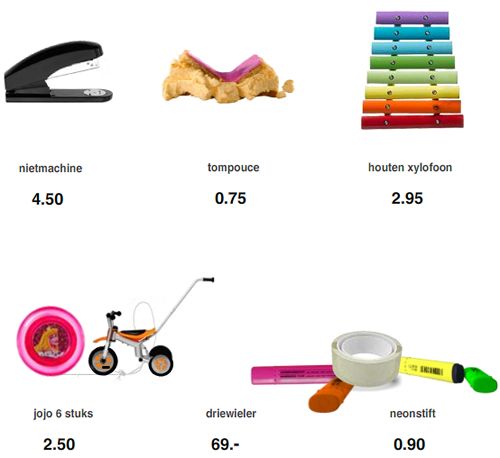
Take a look at HEMA’s product page. You can’t order anything and it’s in Dutch but just wait a couple of minutes and watch what happens on the page.

Charlie’s email proves something that HEMA executives figured out. Make something unique and people will help virally market for you. HEMA’s site has attracted positive attention, just look at these headlines. Who wouldn’t want these types of things associated with their company?

Creativity Matters

Hema - Greatest Store Ever

Great Website

HEMA: Breaking Through The Clutter of Online Retail

Cool Site of the Month

Cool Online Catalog Promo

HEMA: Innovative Error Page or Advertisement - You Decide

HEMA has people touting the greatness of their products, talking about their company, using words like creativity, greatest, cool, and innovative. People don’t mind marketing when it has an entertaining purpose. They embrace it.
Have you seen a great Rube-Goldberg or unique marketing idea? Let us know in the comments.

One of my favorites is Honda’s Rube Goldberg. What sets these apart from other ads is the time and energy in the productions, people appreciate the clever, hard work that makes a few seconds of enjoyment, but a lasting impression.

Listen to this article Listen to this post

History of Religion by MapsofWar.com

A reader emailed me MapsofWar.com and I was intrigued. But the mystery only starts with the amazing visuals spanning 5,000 years of religion or imperialism.

Many clients I work with ask me to visually simplify complex problems and we use various techniques to deliver stunning solutions. Maps of War has used history as the backdrop for an artist who’s medium is Flash and large data sets. Techlife interviewed the creator and artist of Maps of War, who wished to remain anonymous.

Techlife: MoW is a dynamic project, why did you create the first MoW? Which one is it?

Maps of War: The first map was Imperial History of the Middle East. This map was the original idea I wanted to share with everyone, and the overall site was created to showcase it.

Imperial History by MapsofWar.com

(more…)

Listen to this article Listen to this post

TiVo HDWhile they last at Amazon, get a TiVo HD for just $257, saving nearly $45. Of course you also get free ground shipping which makes this an even better deal. I have been reading about all the great features, and am pretty excited about Amazon’s Unbox partnership with TiVo. I will be able to download movies from Amazon and have them show up on my TiVo.

Amazon Unbox and TiVo

Even better with the TiVo HD I can do Progressive Download of Amazon Unbox, which means I can get my movie and start watching just 10 min later. That’s quicker than a trip to the video store!
Techlife has been a long time user of TiVo, since back in 2000 with a TiVo Series 1 when it was a gift from a friend. We thank him every chance we get.

Since then nearly every person who has ever seen our TiVo has not just craved one but bought one. We have returned the favor and bought a few as gifts and the “thank you’s” have been overwhelming. All in all, more than 100 people now have a TiVo home and even more impressive at least 8 come to mind who have multiple TiVo’s in their home.

So it was time. Time for us to consider upgrading the TiVo Series 1. There have been quite a few changes since then, as most people know you are looking at a TiVo Series 2 and a TiVo HD Series 3, but there was an intriguing option that I kept coming back to, the TiVo HD, which didn’t list “series”. This had a lower capacity but still High Definition recording in a PVR with the TiVo software. How could I go wrong? After a bit more research I was sold. It lists for $299.99 in most retailers, but thanks to Amazon’s great deal it is less, at least today.

What is the best feature of your TiVo? What is the best feature of your TiVo Series 2 or Series 3? Leave a comment.

Listen to this article Listen to this post

Techlife TV gets submissions from readers all the time, send yours in. Allan sent in the Christmas bonus level, but while checking it out, we came upon the coolest 8 Bit Nintendo video we have seen in a while. How many games can you name? Super Mario Bros, The Legend of Zelda, Tetris…

8-bit Awesome

The12 Days of Christmas

by: Straight No Chaser - Indiana University

Listen to this article Listen to this post

Google Docs and Spreadsheets new main interface

I often use Google Docs for collaboration with teams who are not uber-geeks tech savvy. Examples include clients, family, fantasy football partners, and charity work. Most of these folks don’t know what RSS or an RSS Reader is at all. They would be happy to subscribe via email though to a document that was going to be important, but today Google doesn’t offer that feature.

As tech leaders (people who read Techlife) I have a simple tool for you to use that might help educate your collaborative group. Funny enough this tool is low tech. Teach your group to “Share”. Here is a copy of an email I send using Google Docs after creating a new document, it helps foster the collaborative work environment that makes Google Docs a great tool. Please feel free to copy and paste this email and send it using the share tab in Google Docs. Your teams will thank you.

I know some of you might not have used Google Docs very much so let me point out another feature/downfall.There is no automated notification of someone’s working on the documents. Meaning you won’t get any emails if people make major/minor changes.

But there is a tab in the upper right hand corner “Share”, click on that and then click on “Email collaborators” which will let you send an email like this one. With anything you want in the body including a pointer to what has changed.

I look forward to seeing your work.

Encourage your teams and collaborators to use Google Docs for documents that need multiple eyes. It will help the whole team. The Google Docs Tip of sharing, with an announcement via email will help keep everyone aware of the document’s changes even without RSS.

This great video featured on Techlife TV sums up the Google Docs experience, “Google Docs in Plain English” by CommonCraft’s Sachi and Lee LeFever.

Do you have any good Google Docs tips? Post them.

manga clips free anime lestai hentai video lesbian{de}yiff Spiel Furryund Geschlecht Pissing scheißendgay Pokemon hentaiBehaarte fucking Grandpareifen Interrassisch Gag-ClipsFoto peeing Mädchen cam tolite hiddenporn hätte MMF InterrassischAsian Versaute scat

Listen to this article Listen to this post

Vote 2 by Steve WoodsEveryday you use many websites. But which of them are everyday websites?

Everyday websites are defined as sites you visit nearly everyday, often multiple times. Useful, fun, informative but most importantly not because someone sent you a link. Techlife is interested in the sites you choose to visit. (online applications count too.)
Google? Yahoo? MSN? Sure these are the most common. NYTimes? ESPN? Wikipedia? These are popular, too. But I am looking for the deeper, more interesting sites and the reasons.

I will post mine here:

  • Google Docs has become a regular for word processing and spreadsheets. I am constantly using it for collaboration with others.
  • FeedCrier to help me pick the best things to read via RSS. Lifehacker, Engadget and Gizmodo pop up pretty frequently.
  • I have been playing too much of Casual Collective’s Multi-Player Desktop Tower Defense. A lot of Techlife readers have joined me with a free invite.
  • I use SmartMoney’s portfolio tracking tools and sometimes Yahoo’s Finance tools to watch and learn about the economy and stock market.
  • I use Tmobile’s Sidekick Desktop Interface to manage my mobile Sidekick device’s online calendar, address book and notes applications. (no link available for general public, subscription only)
  • I watch and edit Techlife TV on Chime.tv. I often just browse other channels and watch for a while, like regular television.

I really want to know what sites everybody else uses and why. Post them in the comments.

ameriquest loans203k ma loansstafford plan a-subsidized loans federalloan ameriquest mortgage paymentloans 203k ct2007 farm bill loan nonrecourseloans louisiana agriculture youth in$333 $100,000 loan month Map

Listen to this article Listen to this post

Techlife TV has our first double feature today. (If you are a mobile or print reader, visit Techlife’s web site to watch.) Today’s theme is image manipulation on your PC.

Photoshop? Illustrator? Corel? Gimp? Picasa? SeaDragon? These programs all owe homage to the grand daddy of them all MS Paint. In this look behind the Microsoft development curtain we catch up with the MS Paint team as they explain how to use MS Paint and how they built it. Riveting.

Now check out a real world application of how a computer could calculate quickly how an image is resized. This is a must see to fully understand. Some researchers in Israel have come up with a way to dynamically resize images in a web page. A web page could be resized, but how would an image know what is important, this video explains how using seams the image can be stitched together and goes way beyond cropping and scaling

I hope you enjoyed the double feature.

Can you spot the faux pas in the MS Paint video? Post your answers below.

free cock gigantic moviesfree gyno moviesfree movie trailers hardcorehardcore movies free samplehorse free fuck moviehot free movies teenfree off movies jerkgalleries latina deepthroat movie free Map

pee 8 moviesporn movies free xxx free moviespreteen sex moviesprivate nurse movielords porn movies tracimovies sex machine vibratormovie things wild scene the sexmovies indian xxx Map

loan $10000 overnightloans amerisaveacceptance loans biloxi msinterst loans 0401k loan hardshiploans aes forgivemessnumber phone ameriloan$5,000 microloan Map

Listen to this article Listen to this post

Beet.TV LogoLook out! Beet.TV has a long tail! “You mean like a monkey?” No, silly. The long tail* of getting attention and now with an avalanche of new content on Techlife TV it looks like they will sustain it. We welcome Beet.TV to our channel with an amazing 50+ new videos for our viewers. It took me by surprise, but I started watching and couldn’t get enough.

Beet.TV interviews Google’s Hunter Walk about the Diet Coke and Mentos videos.

Andy Plesser, (a Jerry Springer look-alike?) is one of the rare “don’t look at me” journalists. It almost appears he doesn’t want to be a star. But his amateur-style trick to stay mostly off-camera and off-microphone compels the viewer to want a bit more Andy. I really like the way he edits himself out of asking the question, since he knows it is not about him. Sure sometimes he appears on camera, and his excitement is like my own. He fumbles for words or even can’t get out his question, but his interviewee connects with him. I saw quite a few people understand his intention and just run with it.

I really like what Beet.TV is doing and hope to see more of their show on Techlife TV.

Note: What I think happened is Beet.TV’s catalog of video was indexed all at once as some of the video is a little older.

* The Long Tail Effect started as an article by Chris Anderson of Wired Magazine and is now a very popular book.

Listen to this article Listen to this post

Chime.tv LogoDid I detect a little spark in David Berlind’s eye? Maybe a hope that he could see his content on a featured Channel? Watch this video where Techlife TV gets the nod in Taylor McKnight’s talk with David Berlind of ZD Net.

Congratulations to Chime.tv winner of the best Mashup at MashupCamp. Taylor, now a two-time winner, sat down and showed David (Berlind) Chime.tv, even mentioning our channel and me by name at the 1:05 minute mark. (Thanks Taylor!)

What’s a Mashup? I will leave it to David to explain that in his video which of course is also on the Techlife TV Channel.

Note to David: Got more vidoes? Let me know and I will add them to Techlife TV.

movies sex swingsilk panty moviesmovie philadelphia soundtrackstrap movie sex onmovies streetbaitteen galeries moviethe redeye movie newtomb raider 2 movie Map

Listen to this article Listen to this post

Raise your hand if Stick Arena or Line Rider are were your favorite time wasters? A new game has taken center stage, Desktop Tower Defense.

It’s quite simple, yet grows in complexity. You are defending against invading circles each with special powers such as speed, morphing and spawning. The circles goal is to cross the desktop. Your goal: Stop them! The best thing about this game are all the variations and how easily no two games could be alike. In addition the author Paul Preece has added many various types of levels and challenges to the game. The game is often talked about online with bloggers providing strategy and even covering Desktop Tower Defense’s advertising partners. Get practicing now.

Desktop Tower Defense Gameboard by Paul Preece

Why the rush? Paul has teamed with Dave to create Casual Collective and they have something new up their sleeve. Just announced is their goal to have multi-player Desktop Tower Defense and other multi-player gaming. Register your username now.

Desktop Tower Defense Group ScoresDid you get the hang of the game? Join the Techlife readers in posting your score to our group scoreboard. Got a great strategy? Share it here. Link to your map and let us see how you arranged things.

Listen to this article Listen to this post

Chime.tv LogoA new chapter begins, Techlife TV. Wait a sec, didn’t we just read about Techlife TV with the posts about Steve Jobs and SeaDragon and Star Wars Robot Chicken? Well kinda, sorta.

Here’s the back story. A few weeks ago we wrote about Chime.tv it was also featured in the syndicated column. No extra software downloads, tons of content, a great interface, the list goes on; what’s not to love?

We built Techlife TV and started selecting videos from the column and others we thought readers might enjoy. After our initial post, Taylor McKnight, must have been reading and brainstorming with Chirag Mehta because they contacted me and have asked me to program the new Techlife TV on Chime.tv’s Premium Channel page. (more…)

Listen to this article Listen to this post

Next Page »