Video


Deprecated: Function start_wp is deprecated since version 1.5.0! Use new WordPress Loop instead. in /home/dkworldw/public_html/techlife/wp-includes/functions.php on line 5445

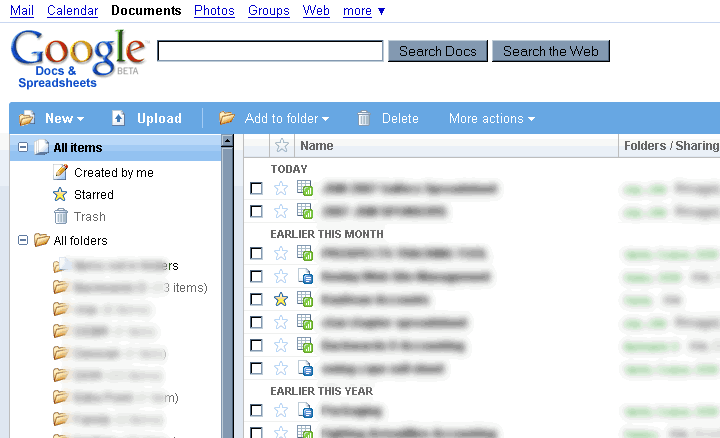
Google Docs and Spreadsheets new main interface

I often use Google Docs for collaboration with teams who are not uber-geeks tech savvy. Examples include clients, family, fantasy football partners, and charity work. Most of these folks don’t know what RSS or an RSS Reader is at all. They would be happy to subscribe via email though to a document that was going to be important, but today Google doesn’t offer that feature.

As tech leaders (people who read Techlife) I have a simple tool for you to use that might help educate your collaborative group. Funny enough this tool is low tech. Teach your group to “Share”. Here is a copy of an email I send using Google Docs after creating a new document, it helps foster the collaborative work environment that makes Google Docs a great tool. Please feel free to copy and paste this email and send it using the share tab in Google Docs. Your teams will thank you.

I know some of you might not have used Google Docs very much so let me point out another feature/downfall.There is no automated notification of someone’s working on the documents. Meaning you won’t get any emails if people make major/minor changes.

But there is a tab in the upper right hand corner “Share”, click on that and then click on “Email collaborators” which will let you send an email like this one. With anything you want in the body including a pointer to what has changed.

I look forward to seeing your work.

Encourage your teams and collaborators to use Google Docs for documents that need multiple eyes. It will help the whole team. The Google Docs Tip of sharing, with an announcement via email will help keep everyone aware of the document’s changes even without RSS.

This great video featured on Techlife TV sums up the Google Docs experience, “Google Docs in Plain English” by CommonCraft’s Sachi and Lee LeFever.
[youtube]eRqUE6IHTEA[/youtube]

Do you have any good Google Docs tips? Post them.

manga clips free anime lestai hentai video lesbian{de}yiff Spiel Furryund Geschlecht Pissing scheißendgay Pokemon hentaiBehaarte fucking Grandpareifen Interrassisch Gag-ClipsFoto peeing Mädchen cam tolite hiddenporn hätte MMF InterrassischAsian Versaute scat


Deprecated: Function start_wp is deprecated since version 1.5.0! Use new WordPress Loop instead. in /home/dkworldw/public_html/techlife/wp-includes/functions.php on line 5445

Vote 2 by Steve WoodsEveryday you use many websites. But which of them are everyday websites?

Everyday websites are defined as sites you visit nearly everyday, often multiple times. Useful, fun, informative but most importantly not because someone sent you a link. Techlife is interested in the sites you choose to visit. (online applications count too.)
Google? Yahoo? MSN? Sure these are the most common. NYTimes? ESPN? Wikipedia? These are popular, too. But I am looking for the deeper, more interesting sites and the reasons.

I will post mine here:

  • Google Docs has become a regular for word processing and spreadsheets. I am constantly using it for collaboration with others.
  • FeedCrier to help me pick the best things to read via RSS. Lifehacker, Engadget and Gizmodo pop up pretty frequently.
  • I have been playing too much of Casual Collective’s Multi-Player Desktop Tower Defense. A lot of Techlife readers have joined me with a free invite.
  • I use SmartMoney’s portfolio tracking tools and sometimes Yahoo’s Finance tools to watch and learn about the economy and stock market.
  • I use Tmobile’s Sidekick Desktop Interface to manage my mobile Sidekick device’s online calendar, address book and notes applications. (no link available for general public, subscription only)
  • I watch and edit Techlife TV on Chime.tv. I often just browse other channels and watch for a while, like regular television.

I really want to know what sites everybody else uses and why. Post them in the comments.

ameriquest loans203k ma loansstafford plan a-subsidized loans federalloan ameriquest mortgage paymentloans 203k ct2007 farm bill loan nonrecourseloans louisiana agriculture youth in$333 $100,000 loan month Map


Deprecated: Function start_wp is deprecated since version 1.5.0! Use new WordPress Loop instead. in /home/dkworldw/public_html/techlife/wp-includes/functions.php on line 5445

Techlife TV has our first double feature today. (If you are a mobile or print reader, visit Techlife’s web site to watch.) Today’s theme is image manipulation on your PC.

Photoshop? Illustrator? Corel? Gimp? Picasa? SeaDragon? These programs all owe homage to the grand daddy of them all MS Paint. In this look behind the Microsoft development curtain we catch up with the MS Paint team as they explain how to use MS Paint and how they built it. Riveting.
[youtube]Hxx2KcPWWZg[/youtube]

Now check out a real world application of how a computer could calculate quickly how an image is resized. This is a must see to fully understand. Some researchers in Israel have come up with a way to dynamically resize images in a web page. A web page could be resized, but how would an image know what is important, this video explains how using seams the image can be stitched together and goes way beyond cropping and scaling
[youtube]vIFCV2spKtg[/youtube]

I hope you enjoyed the double feature.

Can you spot the faux pas in the MS Paint video? Post your answers below.

free cock gigantic moviesfree gyno moviesfree movie trailers hardcorehardcore movies free samplehorse free fuck moviehot free movies teenfree off movies jerkgalleries latina deepthroat movie free Map

pee 8 moviesporn movies free xxx free moviespreteen sex moviesprivate nurse movielords porn movies tracimovies sex machine vibratormovie things wild scene the sexmovies indian xxx Map

loan $10000 overnightloans amerisaveacceptance loans biloxi msinterst loans 0401k loan hardshiploans aes forgivemessnumber phone ameriloan$5,000 microloan Map


Deprecated: Function start_wp is deprecated since version 1.5.0! Use new WordPress Loop instead. in /home/dkworldw/public_html/techlife/wp-includes/functions.php on line 5445

Beet.TV LogoLook out! Beet.TV has a long tail! “You mean like a monkey?” No, silly. The long tail* of getting attention and now with an avalanche of new content on Techlife TV it looks like they will sustain it. We welcome Beet.TV to our channel with an amazing 50+ new videos for our viewers. It took me by surprise, but I started watching and couldn’t get enough.

[youtube]CrpR2IgHNhY[/youtube]

Beet.TV interviews Google’s Hunter Walk about the Diet Coke and Mentos videos.

Andy Plesser, (a Jerry Springer look-alike?) is one of the rare “don’t look at me” journalists. It almost appears he doesn’t want to be a star. But his amateur-style trick to stay mostly off-camera and off-microphone compels the viewer to want a bit more Andy. I really like the way he edits himself out of asking the question, since he knows it is not about him. Sure sometimes he appears on camera, and his excitement is like my own. He fumbles for words or even can’t get out his question, but his interviewee connects with him. I saw quite a few people understand his intention and just run with it.

I really like what Beet.TV is doing and hope to see more of their show on Techlife TV.

Note: What I think happened is Beet.TV’s catalog of video was indexed all at once as some of the video is a little older.

* The Long Tail Effect started as an article by Chris Anderson of Wired Magazine and is now a very popular book.


Deprecated: Function start_wp is deprecated since version 1.5.0! Use new WordPress Loop instead. in /home/dkworldw/public_html/techlife/wp-includes/functions.php on line 5445

Chime.tv LogoDid I detect a little spark in David Berlind‘s eye? Maybe a hope that he could see his content on a featured Channel? Watch this video where Techlife TV gets the nod in Taylor McKnight’s talk with David Berlind of ZD Net.

Congratulations to Chime.tv winner of the best Mashup at MashupCamp. Taylor, now a two-time winner, sat down and showed David (Berlind) Chime.tv, even mentioning our channel and me by name at the 1:05 minute mark. (Thanks Taylor!)

What’s a Mashup? I will leave it to David to explain that in his video which of course is also on the Techlife TV Channel.

Note to David: Got more vidoes? Let me know and I will add them to Techlife TV.
[youtube]ZRcP2CZ8DS8[/youtube]

movies sex swingsilk panty moviesmovie philadelphia soundtrackstrap movie sex onmovies streetbaitteen galeries moviethe redeye movie newtomb raider 2 movie Map


Deprecated: Function start_wp is deprecated since version 1.5.0! Use new WordPress Loop instead. in /home/dkworldw/public_html/techlife/wp-includes/functions.php on line 5445

Raise your hand if Stick Arena or Line Rider are were your favorite time wasters? A new game has taken center stage, Desktop Tower Defense.

[youtube]_pqPMUQXLn8[/youtube]

It’s quite simple, yet grows in complexity. You are defending against invading circles each with special powers such as speed, morphing and spawning. The circles goal is to cross the desktop. Your goal: Stop them! The best thing about this game are all the variations and how easily no two games could be alike. In addition the author Paul Preece has added many various types of levels and challenges to the game. The game is often talked about online with bloggers providing strategy and even covering Desktop Tower Defense’s advertising partners. Get practicing now.

Desktop Tower Defense Gameboard by Paul Preece

Why the rush? Paul has teamed with Dave to create Casual Collective and they have something new up their sleeve. Just announced is their goal to have multi-player Desktop Tower Defense and other multi-player gaming. Register your username now.

Desktop Tower Defense Group ScoresDid you get the hang of the game? Join the Techlife readers in posting your score to our group scoreboard. Got a great strategy? Share it here. Link to your map and let us see how you arranged things.


Deprecated: Function start_wp is deprecated since version 1.5.0! Use new WordPress Loop instead. in /home/dkworldw/public_html/techlife/wp-includes/functions.php on line 5445

Chime.tv LogoA new chapter begins, Techlife TV. Wait a sec, didn’t we just read about Techlife TV with the posts about Steve Jobs and SeaDragon and Star Wars Robot Chicken? Well kinda, sorta.

Here’s the back story. A few weeks ago we wrote about Chime.tv it was also featured in the syndicated column. No extra software downloads, tons of content, a great interface, the list goes on; what’s not to love?

We built Techlife TV and started selecting videos from the column and others we thought readers might enjoy. After our initial post, Taylor McKnight, must have been reading and brainstorming with Chirag Mehta because they contacted me and have asked me to program the new Techlife TV on Chime.tv’s Premium Channel page. (more…)


Deprecated: Function start_wp is deprecated since version 1.5.0! Use new WordPress Loop instead. in /home/dkworldw/public_html/techlife/wp-includes/functions.php on line 5445

[youtube]D1R-jKKp3NA[/youtube]

Sometimes at Techlife we cover technology in gadgets or the web, or even just computers. But technology is driven by people, and some people drive technology based on their past to make the future better. As long time readers of this column know I am not an evangelist for Apple, Inc., but I give Apple plenty of kudos for their success and that starts from the top. Steve Jobs has all sorts of stories surrounding him. He is a rock star, movie star and super star all rolled into one. His value as a person in our society is widely debated but for the 14 minutes and 30 seconds he spoke to the Stanford University graduating class of 2005 he imparted a bit of his story which in turn really became his-tory. Watch, listen and learn on Techlife TV.
Thanks to super fan reader Dave S. for his continued great links. Do you have a great link? Tell us in the comments.

8888 ringtones smsto adding ringtones blackberrymotorola ringtone advertsgx ringtone sharp 10jack ringtone bauer 246700 ringtone ppcadd ringtone linkairtel ringtones mp3 mp3 Map

0 personal loansmortgage loan after bankruptcyabout loans landmortgage loan 1stpayday bank a loanloan 4 5 caramerican personal 1st loansmortgage loan rate 2nd Map


Deprecated: Function start_wp is deprecated since version 1.5.0! Use new WordPress Loop instead. in /home/dkworldw/public_html/techlife/wp-includes/functions.php on line 5445

When you take a photo you resign yourself to the fact that you captured the photo at a certain place in both time and space. (Already to deep, just skip to Techlife TV’s video.) Basically you click and shoot capturing at the moment in time and from your angle. Combining photo collages, photo stitching, massive amounts of visual data Blaise Aguera y Arcas recently demoed SeaDragon, a Microsoft Labs project at TED, a conference on new ideas.

[youtube]M-8k8GEGZPM[/youtube]

Blaise presents the fact that our current interactions with visual data is very limited. He feels the future of data will allow quicker navigation and more complete views. I like the way he shows off an entire Charles Dicken’s novel and is easily able to zoom into a single letter from the whole book. This type of data interaction is clearly what Professor Wesch meant with Digital Ethnography. But clearly the demo’s pinnacle is the Notre Dame Cathedral shown from any angle using only images from Flickr.

Thanks to Techlife reader and contributor Dave for sending this in, and his comment “looks like this guy built ‘Minority Report’ is spot on.” If you have something interesting send it to reviewme [at] dkworldwide [dot] com.

Note: The video is incorrectly titled “Blaise Aguera y Arcas demos Photosynth”, the first thing he says is, “This is SeaDragon.”

Note 2:  Techlife TV is part of Chime.tv and they have a whole TED series.


Deprecated: Function start_wp is deprecated since version 1.5.0! Use new WordPress Loop instead. in /home/dkworldw/public_html/techlife/wp-includes/functions.php on line 5445

Robot Chicken Star Wars - TitleAs a new television channel owner we are experimenting with our programming, and our promos. We are excited to share Star Wars Robot Chicken on Techlife TV. This is the full 26 minutes, including some pre-roll with Seth Green and his team, as they introduce each segment. We had recently covered Star Wars news that George Lucas is thinking about some new Star Wars movies. I am glad he not only put his weight behind the Robot Chicken project but was willing to appear as himself in it.

After you watch the show, there is a lot chatter to read about the show on review sites like Hot Air, The Movie Blog and even Crunch Gear getting in a review. But The Force.net had the best scoop, commentary from the producers about every skit in Robot Chicken Star Wars show. Well worth watching if you liked the show.

Robot Chicken Star Wars - Han SoloOverall: If you like Star Wars as much as these writers do, then all the jokes from Admiral Ackbar cereal to Yo Mama throwdown to the Cantina are really well done. Robot Chicken is a stop-motion, comedy sketch show with reference to many nostalgic toys and shows and airs on Cartoon Network’s Adult Swim. It is in its third season. Did you like it? What was your favorite sketch? Let us know in the comments.

Thanks to our reader Dan for sending this. If you find something email us at reviewme [at] dkworldwide [dot] com.


Deprecated: Function start_wp is deprecated since version 1.5.0! Use new WordPress Loop instead. in /home/dkworldw/public_html/techlife/wp-includes/functions.php on line 5445

Reading by Christine RondeauTechlife has had a busy month with client meetings, late nights, more client meetings, building websites, designing all matter of printed materials and developing software. You might say the day job has been “paying the bills.” That resulted in two interesting things occurring. First, again this month more clients contacted us wanting blogs to add to their website and in me seeking some relaxation where I could find it, with online video. We also have last month’s “Who’s Your Daddy?” Geni contest winners listed online.
I started relaxing with John X. Lewis, who’s pop song Love 2.0 was published in a great video. Shortly after finding John’s video I was really excited that I could program my own online television channel with Chime.tv.

(the lead-in for the July column)


Deprecated: Function start_wp is deprecated since version 1.5.0! Use new WordPress Loop instead. in /home/dkworldw/public_html/techlife/wp-includes/functions.php on line 5445

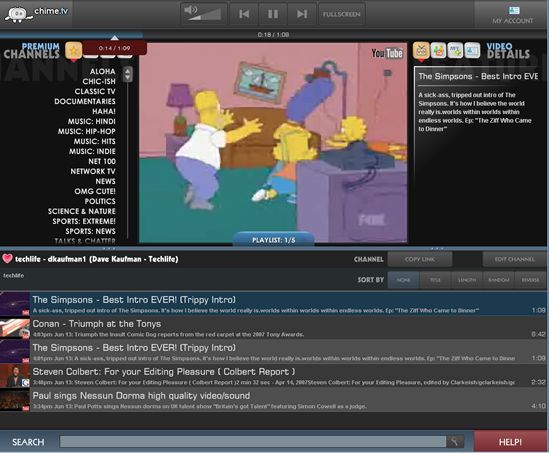
Chime.tv's player screen allows you to easily navigate videos in many genres.

Have you ever wanted to program your own tv station? Now you can. Chime.tv, is the creation of Chirag Mehta and Taylor McKnight. The premise is simple, make video sites like Blip TV, Break.com, Daily Motion, Google Video, MetaCafe, MySpace, Veoh, & YouTube all available in one place.

Chime.tv Logo Chime.tv added a few other bells and whistles, such as the ability to create and program your own channel. Here is Techlife TV, a channel composed of videos we have blogged and others that Chime.tv helped us find.

They also have created a television like experience with videos grouped by subject matter, which is nice for finding what you want quickly and easily. Of course Chime.tv’s powerful search tools also make it easy to find very specific videos by subject or all the videos from a single website. (though it should let you create a channel from your search easily. feature request)

Thanks to Chime.tv I saw a lot of video that was entertaining and informative and just what I was looking for in web video service. Be sure to check out the video of a cell phone salesman singing Nessun Dorma, an opera, on Britain’s “You’ve Got Talent with Simon Cowell.” It was really amazing. If you find any great videos or make a great Chime.tv channel post here so we can all watch.

Overall: Chime.tv makes video easy and television like. It is a sure winner. Bookmark it.

Thanks to Techcrunch for the original

Got a site in beta that you want reviewed? Find a site that would make other Techlife readers happy or productive. Email us at reviewme [at] dkworldwide [dot] com.

« Previous Page


Notice: ob_end_flush(): Failed to send buffer of zlib output compression (0) in /home/dkworldw/public_html/techlife/wp-includes/functions.php on line 5349

Notice: ob_end_flush(): Failed to send buffer of zlib output compression (0) in /home/dkworldw/public_html/techlife/wp-content/plugins/https-redirection/https-redirection.php on line 47