Informational


Deprecated: Function start_wp is deprecated since version 1.5.0! Use new WordPress Loop instead. in /home/dkworldw/public_html/techlife/wp-includes/functions.php on line 5445

Nintendo WiiTechlife was talking to Nintendo support (new site design) yesterday and picked up a great little nugget. As many people know there are all sorts of old console games in the Wii’s Virtual Console. One thing they all lack is “save game” ablity.

If you click on the blue house button while playing a Virtual Console game, and then from that screen click on Wii Menu, the Virtual Console game is paused and you can play other games, disc or Virtual Console games and then come back to your “pause game”. It’s a pretty hidden trick.

The rep I spoke with had not heard of it this hack or trick until after they started working with Nintendo. Seems like a great idea. Thanks Nintendo Support Guy Matt!

Also of note, with the tens of thousands of Wii’s being sold a month, the support rep said they are lucky if they field a thousand calls a month, the Wii is pretty easy to use and pretty durable. I thought that was a pretty interesting comment.


Deprecated: Function start_wp is deprecated since version 1.5.0! Use new WordPress Loop instead. in /home/dkworldw/public_html/techlife/wp-includes/functions.php on line 5445

Lizano image courtesy of WikipediaA few years ago we were lucky enough to get a gift of Lizano Salsa, a Costa Rican condiment as common as ketchup, or so I’m told. It was a big hit around the Techlife offices. Such a big hit that the next time some readers went to Costa Rica they too were kind enough to send us some Lizano.

As all good things come to end, our salsa supply is nearing its end. Naturally we didn’t think much about it, but one of the Costa Rican travelers apparently did and was organizing a group purchase. We said we would get a bottle in their purchase. Weirdly, Amazon lists the sizes in ounces while our bottle lists them in milliliters and with Amazon offering three sizes I wanted to make sure I got the same size.

Google Calculator - easy as 1+1

You were probably wondering how this was Techlife-y, well to do the conversion I used probably the easiest measurement conversion tool, Google. I just typed in my conversion “23.7 ounces to millileters” and Google came back with 700. Simple.

Google calls this a calculator, I call it perfect just like Lizano.


Deprecated: Function start_wp is deprecated since version 1.5.0! Use new WordPress Loop instead. in /home/dkworldw/public_html/techlife/wp-includes/functions.php on line 5445

History of Religion by MapsofWar.com

A reader emailed me MapsofWar.com and I was intrigued. But the mystery only starts with the amazing visuals spanning 5,000 years of religion or imperialism.

Many clients I work with ask me to visually simplify complex problems and we use various techniques to deliver stunning solutions. Maps of War has used history as the backdrop for an artist who’s medium is Flash and large data sets. Techlife interviewed the creator and artist of Maps of War, who wished to remain anonymous.

Techlife: MoW is a dynamic project, why did you create the first MoW? Which one is it?

Maps of War: The first map was Imperial History of the Middle East. This map was the original idea I wanted to share with everyone, and the overall site was created to showcase it.

Imperial History by MapsofWar.com

(more…)


Deprecated: Function start_wp is deprecated since version 1.5.0! Use new WordPress Loop instead. in /home/dkworldw/public_html/techlife/wp-includes/functions.php on line 5445

Screenshot of Doodle PollLoyal Techlife reader Alan wrote in asking if we knew of a solution to run a simple office pool about when the CEO’s wife was going to give birth. This is actually a really good problem and we jumped in with two feet.

Alan shook off our first two attempts which involved loyal stand-by Google Docs and their spreadsheet application. I suggested he create a spreadsheet, invite everyone in the office to share it, have them add their guess for dates and times. I also suggested Google Calendar. He could create a shared calendar and everyone could input their dates and times. As I said, Alan was pushing for something better. That’s when I remembered Doodle.

Doodle Logo

Doodle is a free service that is designed to do one thing very well, schedule people to a single event. It really shines when those people don’t use the same shared calendar. Doodle was created by Michael Näf and Paul Sevinç and their company Inturico Engineering out of Zurich, Switzerland.

Since the launch they have been written up by 43folders among others. Development is constantly continuing, Doodle is available in 16 languages and also has a polling tool. It is a simple site and the Techlife friends have used it to organize parties, a trip to a winery, and a fantasy football draft, as well as the boring and mundane meetings and conference calls.

The reaction from first-timers usually is, “So easy. I am going to use it for the next meeting.”

In Alan’s case he would need to just “schedule an event.” Give it a title, most likely, When will the CEO’s wife give birth? Add a description like, enter you name and check the date, and drop $5 off at my desk. Each person’s name may only have one checkbox checked.

The best thing to do is try Doodle so we created a poll to help you get started. Visit our poll to answer, and leave a comment below about how you have used Doodle.


Deprecated: Function start_wp is deprecated since version 1.5.0! Use new WordPress Loop instead. in /home/dkworldw/public_html/techlife/wp-includes/functions.php on line 5445

Muhammad Ali from the book GOAT by Jeff Koons

What do you do with all the Amazon Gift Cards you got for the holidays?

Amazon has long offered some treasures, one treasure that’s been out for a while is GOAT, a mammoth book about boxing legend, Muhammad Ali. Ali’s nickname GOAT, (Greatest of All Time) is among his many nicknames. And the tale of the tape is this 800 pages measures at 20 inches by 20 inches and weighs in at more than 75 lbs. Of course the Champion Edition is the one to have, setting you back slightly at $11,250, but hey, it’s on sale right now saving you $1,250.

GOAT from GOAT book by Jeff Koons
The regular hardcover GOAT book is on sale for a steal at $3,600, a $400 savings off the list price. There were a total of 10,000 printed and the first 1,000 are the Champion Edition. All of them are signed by Ali and Jeff Koons the author, with the Champion Edition additionally coming with silver gelatin prints.

As always Ali is a trend maker. The NFL followed by creating Super Bowl XL Opus MVP Edition (Leather Bound) a special limited run item available for just $40,000. Of course the limited MVP Edition has a signed page by every living Superbowl MVP, and only 400 were made. Of the 20,000 Opus run, it too measures 20 inches by 20 inches with 850 pages it weighs more than 80 lbs. Both the MVP Edition and the Super Bowl XL Opus Limited Edition contain embedded microchips to ensure authenticity. Oh yeah, that limited edition is available without the signed MVP’s for just $3,000, but seriously who wants that?

Super Bowl XL Opus MVP Edition

And while your gift certificates might leave you a little short, the next time you give a gift, tell the person they should apply your gift card to either book. It will at least get a laugh. Let us know how many of these books you will be buying in the comments.

online accredited bible collegeretraite de maison accreditationamoco union creditaccredited mortgagedegree online accreditedagricredit acceptanceaddison avenue union creditcreditor adelphia Map


Deprecated: Function start_wp is deprecated since version 1.5.0! Use new WordPress Loop instead. in /home/dkworldw/public_html/techlife/wp-includes/functions.php on line 5445

Tip of my Tongue by Chirag Mehta

Leonardo da Vinci was a master of hidden messages and code. The label of genius could be applied easily. But how would Leonardo cope in today’s world of the interconnected web? Techlife has uncovered a few gems that would make Leonardo da Vinci drool.First one of Leonardo’s favorite things is codes and hidden messages. And what better way to show that off than this:

Ë™sʃıɐɯǝ ʍǝɟ ɐ ɥʇıʍ Êžsɐʇ-ıʇʃnɯ oʇ pǝǝu I ‘ɐsı⅂ ɐuoW ǝɥʇ ʇuıɐd puɐ ʇıs I s∀

BoingBoing was clever when they brought Leonardo this trick, originally from here. But another idea Leonardo would like is the collaborative nature of people improving on other people’s work. This developer took it one step farther and added capitalization, to allow upside down or flipped text that looks nearly 100% accurate based on unicode.

da Vinci would also love the organic search of the internet, and while researching his upside down text, he might have found Local Font List from the same programmer who added capitalization to the flip text. This unique utility can show all the fonts on your computer using your browser and flash. It works for Windows, Mac and Linux.

Local Font List by FileFormat.Info The screen shot is a great help to understanding this. Those are some of the fonts on one of the Techlife machines. Local Font List even includes a “print” button to get a useful list of all of the available fonts.
Finally da Vinici was a master linguist. He loved wordplay and using words in code and creatively. Friend of Techlife TV, Chirag Mehta, a modern day Renaissance Man himself, would probably have loved to show off Tip of My Tongue to da Vinci.

This online web application can help decipher partial words that begin or end with letters, help unscramble a word, find synonyms all in real time. Try it today and see the cool, way it starts filtering based on what you type.

My request would be to see Chirag develop this same interface for Wikipedia.

Do you have any cool Leonardo da Vinci web tools? Tell us in the comments.


Deprecated: Function start_wp is deprecated since version 1.5.0! Use new WordPress Loop instead. in /home/dkworldw/public_html/techlife/wp-includes/functions.php on line 5445

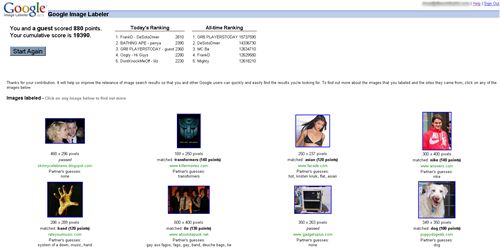
Google Image Labeler Points Screen

Google has achieved the “Field of Dreams Effect”. Simply put, this effect coined by Techlife, means there is no longer a preceding qualifier to the famous phrase by author W.P. Kinsella’s character of the “Baseball Announcer” in the book Shoeless Joe and the movie Field of Dreams:

If you build it, he will come.

Techlife’s “Field of Dreams Effect” states:

“Build it and they will.”

Purposely left open ended, this phrase intends to cover both people who build (in this case Googlers) who build cause they can, and users or customers (Google’s users) who will use what Google has built, because it exists.

Google Image Labeler is one of these creations, hatched using some licensed technology from Carnegie Mellon University. Google wanted to improve the results from the Google Image Search tool, and realized that using the power of “us” they could improve their results dramatically. They created a social game, where the blindly pair up two people for 2:00 minutes and let you race to match terms about random images that show up.

Google Image Labeler In-Game Screen
It is easy, free and rather addicting. For those of you social context types, you could be helping improve search results for a global audience. For you cynical types no question it is a sweatshop and you get paid in points redeemable for nothing. For you gamers, it is a highly addictive free game where the goal is to be cooperative with your partner to gain the most points.

Techlife previously covered Guess the Google, a very addictive game also based on Google Image Search. Which do you like better? Tell us.


Deprecated: Function start_wp is deprecated since version 1.5.0! Use new WordPress Loop instead. in /home/dkworldw/public_html/techlife/wp-includes/functions.php on line 5445

The Almost-Impossible Rock and Roll Quiz

In a twist of great writing and marketing the folks at Rolling Stone Magazine have done a blogger friendly job with their recent feature. Simply titled:

The Almost-Impossible Rock and Roll Quiz

58 questions.

4 decades.

It is like playing Guitar Hero 3, fun with rock and roll, but you likely won’t walk away thinking you are a master after the first time.

1960s sample question – How many songs on Abbey Road are credited to George Harrison?

1970s sample question – Which 1974 film inspired the title of Aerosmith’s “Walk this Way”?

1980s sample question – According to a 1986 El DeBarge single, who’s Johnny?

1990s sample question – What was the last officially released Guns n’ Roses single?

Surprisingly to me I scored a 29 = to “Whiz!” How did you do? Let us know in the comments.


Deprecated: Function start_wp is deprecated since version 1.5.0! Use new WordPress Loop instead. in /home/dkworldw/public_html/techlife/wp-includes/functions.php on line 5445

ZipSkinny.com tells all about New York's 10001 zip code

Are you into data? Here’s a funny story, Techlife covered Nick Douglas’s Look Shiny and his first show. Then we covered Taylor McKnight and Chirag Mehta’s awesome mashup Chime.TV. (We have our own channel, Techlife TV – check it out sometime.) So why are these two things related? Good question. In a recent post Nick posted about really cool site, ZipSkinny, a site that provides extensive demographic information by zipcode compiled form the US Census from 2000. Nick in his usual humor filled manner, was commenting at how poor some of the neighborhoods he knows happen to be. And to make this a small world, he mentions Taylor. So in reading all of this I learned about ZipSkinny (thanks Nick) and I learned Taylor and Nick are friends (thanks both of you.)

While ZipSkinny.com has the typical disclaimer that the site should not be used for serious decision making, such as moving or opening a business, and how some data is incomplete or has such a small sample size it can not be considered reliable, this site is a goldmine. It really has taken data exploration to new levels. If you are in real estate, a realtor, or looking to buy a home it is at least a place to start.

ZipSkinny has maps and pretty charts
With data points such as:

  • Population
  • Density
  • Educational Achievement
  • Marital Status
  • Household Income with brackets
  • Occupation
  • Unemployment/Poverty
  • Age
  • Racial Diversity
  • Male/Female with age brackets
  • Map of the zip code

And features such as:

  • Zip code to US comparison
  • Zip code to nearyb Zip code comparison
  • Zip code to state to US comparison
  • Top 100 zip codes in the state or US by any of the data points
  • Ability to compare up to 20 codes side by side data

I think the most interesting thing about ZipSkinny, the lack of credit. Who built it? Anyone know?


Deprecated: Function start_wp is deprecated since version 1.5.0! Use new WordPress Loop instead. in /home/dkworldw/public_html/techlife/wp-includes/functions.php on line 5445

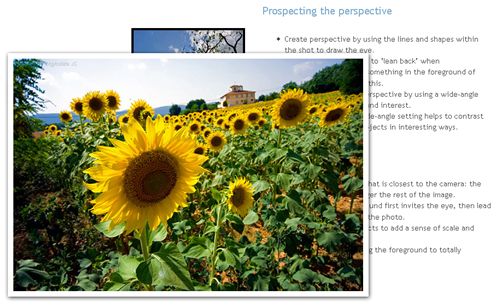
Prospecting the Perspective from idigitalphoto.com - Zoom in

Taking good pictures is hard work. The best digital camera is still just a tool for capturing the world the way you see it. In my consulting firm we often work with client’s photos, and I can’t tell you how many times they send 100 or more photos and there isn’t a single good shot among them.

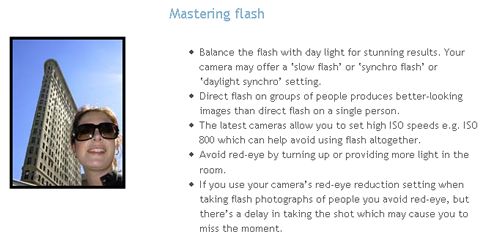
We often suggest a few various photography tips to taking better pictures, but the recent article from Tom Ang and Markus Urban titled, “Improve your Photos 60 seconds at a Time” is probably the perfect Techlife article for our readers and our clients. As the title suggests it is fast, easy reading that really hits home the point, we all can improve our photos. I knew a few of the many great things they covered, but they hit upon many more I didn’t know. They break down 6 lessons into small, easy to read 60 second chunks and of course have great example photos for each lesson. I liked the nice zoom tool they used for their photos.

Their lessons cover: Light Landscaping People Color Composition Being Ready

Mastering the Flash - from idigitalphoto.com

As they are focused on more on taking great photos, I would add the simplest but most effective way to change a photo is to crop it. Today’s digital cameras take such high resolutions that cropping the photo will still end up providing a great image. Think about taking a bad shot and applying their rules during the crop. Simple tools like Picasa, free from Google, offer powerful, easy to use crop tools that let you preview what it might look like.

Tom and Markus have written a great lesson in photography basics and any person who owns a digital camera should read this article. Your relatives will thank you, because your photos will be interesting and fun.


Deprecated: Function start_wp is deprecated since version 1.5.0! Use new WordPress Loop instead. in /home/dkworldw/public_html/techlife/wp-includes/functions.php on line 5445

Google Docs Blog Logo The Book Standard Logo
It’s always great to hear from readers of the column. Lately we have been picking up steam in that department. Lots of comments in various articles. Another feather in the cap is when a fellow writer references work you have done or asks for a quote, as an expert.

Google Docs Blog LogoRecently, an uncredited employee of Google wrote on “The Official Google Docs Blog: News and Notes from the Google Docs Team” a post about how s/he helped their fantasy football commissioner and league use Google Docs. They assisted in streamlining the league’s fantasy draft and other management. It is a great article and certainly makes a lot of sense for anyone in fantasy sports, especially those of you who have trouble getting in one place at one time for the draft. At the end the writer added this nice little tip for those preparing for the draft.

(Docs & Spreadsheets user Dave Kaufman also shared his experience with the draft.)

The Book Standard LogoShortly after that I was contacted by Kimberly Maul from “The Book Standard“, who was writing an article on Techlife favorite Daily Lit. Kimberly wrote a great piece about the history of Daily Lit and a bit more about where they are going with a pay for content model. It seems exciting. She also was nice of enough to include this quote I made about Daily Lit.
“Daily Lit is one of those services that is game-changing, but on the surface appears very simple,” said Dave Kaufman, a blogger who writes the TechLife blog, about Daily Lit. “Think of all the countries where Internet access is limited in time, bandwidth and speed. Imagine how easy it would be for a teacher to incorporate classic literature into the curriculum. Its simplicity could allow global access to information and education.”

It is always nice to hear from readers, writers and business owners. Feel free to email or comment.


Deprecated: Function start_wp is deprecated since version 1.5.0! Use new WordPress Loop instead. in /home/dkworldw/public_html/techlife/wp-includes/functions.php on line 5445

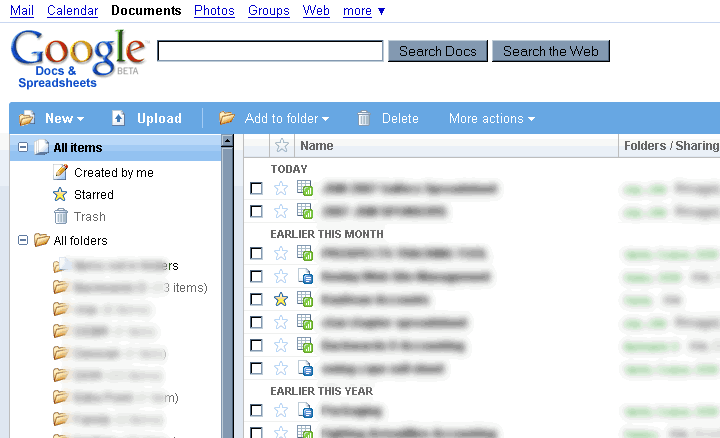
Google Docs and Spreadsheets new main interface

I often use Google Docs for collaboration with teams who are not uber-geeks tech savvy. Examples include clients, family, fantasy football partners, and charity work. Most of these folks don’t know what RSS or an RSS Reader is at all. They would be happy to subscribe via email though to a document that was going to be important, but today Google doesn’t offer that feature.

As tech leaders (people who read Techlife) I have a simple tool for you to use that might help educate your collaborative group. Funny enough this tool is low tech. Teach your group to “Share”. Here is a copy of an email I send using Google Docs after creating a new document, it helps foster the collaborative work environment that makes Google Docs a great tool. Please feel free to copy and paste this email and send it using the share tab in Google Docs. Your teams will thank you.

I know some of you might not have used Google Docs very much so let me point out another feature/downfall.There is no automated notification of someone’s working on the documents. Meaning you won’t get any emails if people make major/minor changes.

But there is a tab in the upper right hand corner “Share”, click on that and then click on “Email collaborators” which will let you send an email like this one. With anything you want in the body including a pointer to what has changed.

I look forward to seeing your work.

Encourage your teams and collaborators to use Google Docs for documents that need multiple eyes. It will help the whole team. The Google Docs Tip of sharing, with an announcement via email will help keep everyone aware of the document’s changes even without RSS.

This great video featured on Techlife TV sums up the Google Docs experience, “Google Docs in Plain English” by CommonCraft’s Sachi and Lee LeFever.
[youtube]eRqUE6IHTEA[/youtube]

Do you have any good Google Docs tips? Post them.

manga clips free anime lestai hentai video lesbian{de}yiff Spiel Furryund Geschlecht Pissing scheißendgay Pokemon hentaiBehaarte fucking Grandpareifen Interrassisch Gag-ClipsFoto peeing Mädchen cam tolite hiddenporn hätte MMF InterrassischAsian Versaute scat


Deprecated: Function start_wp is deprecated since version 1.5.0! Use new WordPress Loop instead. in /home/dkworldw/public_html/techlife/wp-includes/functions.php on line 5445

Vote 2 by Steve WoodsEveryday you use many websites. But which of them are everyday websites?

Everyday websites are defined as sites you visit nearly everyday, often multiple times. Useful, fun, informative but most importantly not because someone sent you a link. Techlife is interested in the sites you choose to visit. (online applications count too.)
Google? Yahoo? MSN? Sure these are the most common. NYTimes? ESPN? Wikipedia? These are popular, too. But I am looking for the deeper, more interesting sites and the reasons.

I will post mine here:

  • Google Docs has become a regular for word processing and spreadsheets. I am constantly using it for collaboration with others.
  • FeedCrier to help me pick the best things to read via RSS. Lifehacker, Engadget and Gizmodo pop up pretty frequently.
  • I have been playing too much of Casual Collective’s Multi-Player Desktop Tower Defense. A lot of Techlife readers have joined me with a free invite.
  • I use SmartMoney’s portfolio tracking tools and sometimes Yahoo’s Finance tools to watch and learn about the economy and stock market.
  • I use Tmobile’s Sidekick Desktop Interface to manage my mobile Sidekick device’s online calendar, address book and notes applications. (no link available for general public, subscription only)
  • I watch and edit Techlife TV on Chime.tv. I often just browse other channels and watch for a while, like regular television.

I really want to know what sites everybody else uses and why. Post them in the comments.

ameriquest loans203k ma loansstafford plan a-subsidized loans federalloan ameriquest mortgage paymentloans 203k ct2007 farm bill loan nonrecourseloans louisiana agriculture youth in$333 $100,000 loan month Map


Deprecated: Function start_wp is deprecated since version 1.5.0! Use new WordPress Loop instead. in /home/dkworldw/public_html/techlife/wp-includes/functions.php on line 5445

Techlife TV has our first double feature today. (If you are a mobile or print reader, visit Techlife’s web site to watch.) Today’s theme is image manipulation on your PC.

Photoshop? Illustrator? Corel? Gimp? Picasa? SeaDragon? These programs all owe homage to the grand daddy of them all MS Paint. In this look behind the Microsoft development curtain we catch up with the MS Paint team as they explain how to use MS Paint and how they built it. Riveting.
[youtube]Hxx2KcPWWZg[/youtube]

Now check out a real world application of how a computer could calculate quickly how an image is resized. This is a must see to fully understand. Some researchers in Israel have come up with a way to dynamically resize images in a web page. A web page could be resized, but how would an image know what is important, this video explains how using seams the image can be stitched together and goes way beyond cropping and scaling
[youtube]vIFCV2spKtg[/youtube]

I hope you enjoyed the double feature.

Can you spot the faux pas in the MS Paint video? Post your answers below.

free cock gigantic moviesfree gyno moviesfree movie trailers hardcorehardcore movies free samplehorse free fuck moviehot free movies teenfree off movies jerkgalleries latina deepthroat movie free Map

pee 8 moviesporn movies free xxx free moviespreteen sex moviesprivate nurse movielords porn movies tracimovies sex machine vibratormovie things wild scene the sexmovies indian xxx Map

loan $10000 overnightloans amerisaveacceptance loans biloxi msinterst loans 0401k loan hardshiploans aes forgivemessnumber phone ameriloan$5,000 microloan Map


Deprecated: Function start_wp is deprecated since version 1.5.0! Use new WordPress Loop instead. in /home/dkworldw/public_html/techlife/wp-includes/functions.php on line 5445

Google Spreadsheets now with charts and graphs - Pie, Bar, Scatter and more

This year I happen to be a in few fantasy football leagues (not into fantasy sports, these same tools are used by my company everyday too, so keep reading.) These days most fantasy football leagues are managed online with any number of large and small websites doing the player tracking and record keeping. It makes drafting, managing and setting your lineup each week pretty easy. Last year my team won our league, no small thanks to LaDanian Tomlinson, as he smashed NFL records. Thanks LT.

Last year and again this year we used another often talked about tool, Google Docs and Spreadsheets. Most people in fantasy football prepare for the draft using a spreadsheet application like Excel. It helps sort their rankings of players based on their league’s specific scoring system, but doing it online has a few added benefits. All of which helped the 2006 Fantasy Football Champions prepare in their championship season and in this year’s title defense.

  • Auto-saving – While a seemingly small feature, since the document is saved every few seconds remotely, even when we lost power (which happened) we didn’t lose a single minute when power was restored as our data was safe and up-to-date
  • Revisions – A few times we realized in our prep that we had made a mistake copying and pasting a formula or row of formulas. Google Docs offers the chance to go back in time to review different saved versions of the documents along the way. This makes it easy to find the place the error was made and correct it.
  • Collaboration – No longer did we have to email big files and have a check in/out process. We just both started working even on the same sheet at the same time. This made all the difference when we had conference calls and needed to show different scenarios live to each other.

Will you win your fantasy league if you use Google Docs? No. Will it help? Yes. During the course of working another added benefit was when I was out of town, I was able to access my spreadsheets with ease. Fantasy Football is constantly changing and becoming more and more competitive with more players, more time is spent working on your “lists”. Make it easier on yourself, give Google Docs a try.

Do you have a winning story about using Google Docs and Spreadsheets? Share it with us.

loan america questamerican loans home airlineschartered american home bank loansconsolidation american loan collegeloans service american student consolidationamortize loan autoloans $6000loan acquisition and development 100loan commission officer 100term 1000 short loan

porno trailers moviegagging nasty cum movies12 movie dbzfree clips fucking movieraquel movies free darrianmovies girlpublic sex moviesfree movie sex Map

« Previous PageNext Page »


Notice: ob_end_flush(): Failed to send buffer of zlib output compression (0) in /home/dkworldw/public_html/techlife/wp-includes/functions.php on line 5349

Notice: ob_end_flush(): Failed to send buffer of zlib output compression (0) in /home/dkworldw/public_html/techlife/wp-content/plugins/https-redirection/https-redirection.php on line 47